https://github.com/falcosecurity/falco
https://github.com/falcosecurity/falcosidekick
https://falco.org/blog/extend-falco-outputs-with-falcosidekick/
executive summary
Falco and SideKick are open source tools which act as senors to monitor for indicators of compromise on your Kubernetes platform. The tools are officially part of The Cloud Native Computing Foundation (CNCF). If your looking for a low-cost yet effective way to put sensors on your Kubernetes environment, then with a bit of testing and partnership with your Application teams you can build a nice detective security control.
Natively Falco can provide Syslogs and gRPC which can be forwarded to your existing SIEM. Additionally, Sidekick enables you to integrate into many other upstream services. At the time of this writing, SideKick enables integration with the following external services.
- Slack
- Rocketchat
- Mattermost
- Teams
- Datadog
- Discord
- AlertManager
- Elasticsearch
- Loki
- NATS
- STAN (NATS Streaming)
- Influxdb
- AWS Lambda
- AWS SQS
- AWS SNS
- AWS CloudWatchLogs
- AWS S3
- SMTP (email)
- Opsgenie
- StatsD (for monitoring of
falcosidekick) - DogStatsD (for monitoring of
falcosidekick) - Webhook
- Azure Event Hubs
- Prometheus (for both events and monitoring of
falcosidekick) - GCP PubSub
- GCP Storage
- Google Chat
- Apache Kafka
- PagerDuty
- Kubeless
- OpenFaaS
- WebUI (a Web UI for displaying latest events in real time)
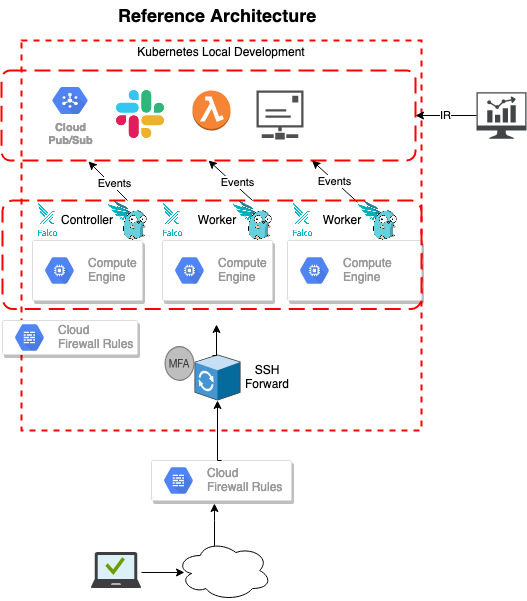
Alerts can then be tuned for higher risk activity using many free / community provided open source rules much like SNORT etc. etc. A generic reference architecture might look similar to the following …
What can Falco detect?
Falco can detect and alert on any behavior that involves making Linux system calls. Falco alerts can be triggered by the use of specific linux system calls, their arguments, and by properties of the calling process.
For example, Falco can easily detect incidents including but not limited to:
- A shell is running inside a container or pod in Kubernetes
- A container is running in privileged mode, or is mounting a sensitive path
- A server process is spawning a child process of an unexpected type
- Unexpected read of a sensitive file, such as
/etc/shadow - A non-device file is written to
/dev - A standard system binary, such as
ls, is making an outbound network connection - A privileged pod is started in a Kubernetes cluster
If you’d like to learn more about how other companies are adopting this solution in real-life, you should also read the following article
poc scope
This PoC will
- Install Falco daemons on one K8 controller
- Install Falco daemons on two worker nodes in GCP
- Update the /etc/falco/falco_rules.yaml with additional rules
- Perform some light offensive security tests on falco
- Integrate the Falco system into an end-to-end an external storage and monitoring solution
This PoC will not
- Harden the entire stack, that will come in a later demos during compliance scans and pen testing
getting started

Dependencies
I’ve already done the below items and I’m assuming that folks reading this are at a similar point in their journey.
- Install Kubernetes standalone, EKS or GKE
- Enable Authentication and RBAC on the K8 cluster
- Install them on a private network address space so they are not exposed to internet
- If you need access over internet for kubectl, then create a bastion SSH forward proxy without terminal / interactive mode
- Lock down the bastion host to only your IP address
- Consider adding a Yubikey or DUO push authentication flow to SSH
standalone architecture
The general installation architecture without external integration looks like this.

install falco on the controller and workers
You have the architecture option to either install falco as a systemd or as a k8 daemonset. Industry seems to suggest that falco daemonsets make patches and upgrades easier on adopters. In this example, I’m just going to perform the simple install as a daemon then move onto HELM charts. This can be passed in your meta-data scripts, cloud formations, terraforms etc. etc. or you can use the HELM method daemon-sets too.
# I started with a Daemon install, however later the Falco and Sidekick integration seem to be easier with HELM. However, for a quick manual validation I found the daemon install easier because there are more utilities on the local server than in the container daemonsets.

https://falco.org/docs/getting-started/installation/
Explore the arguments to better understand the options of the program. There are various options to expose and output the alerts etc. etc.
falco --help Explore the default rules
- https://falco.org/docs/rules/
- https://github.com/falcosecurity/falco
- cat /etc/falco/falco_rules.yaml
The rules engine is the bread and butter of the falco. However, the rules need to be tailored based on the unique functionality of the underlying containers. Some rules alert on common indicators of compromise which may be legitimate behaviors in rare situations. If you try and install and run the default rules within a complex container environment then you’ll generate false positives that create noise and bury the useful alerts. Here’s a few example of what I’ve seen far.
rule: Terminal shell in container
This is a critical control to detect backdoor access. However cluster admins or developers may use this feature which would create flase positives. A strategy may be to lock down critical / sensitive containers or production workloads to prevent and alert on the use of EXEC. Updating the fields: [proc.name, container.image.repository] becomes important.
rule: Launch Privileged Container
This is a critical alert control, however you don’t update trusted_images with the common k8 control plane containers then you’ll generate false positives. This is also a good container to test for PSP effectiveness.
rule: System user interactive
This is a critical alert control, however you don’t update fields: [user.name, proc.name] with the common application users and processes then you’ll generate false positives. This is also a good container to test for PSP effectiveness.
– rule: Schedule Cron Jobs
This may be a legitimate application behavior, however you don’t update fields: [user.name, proc.name] you’ll generate false positives.
– rule: Write below binary dir
If this is applied correctly it can be be useful. For example, restricting writes to /etc or other critical .config files and directories.
rule: Non sudo setuid
This is a good rule for a common privilege escalation attack
– rule: Disallowed SSH Connection
This is a good rule for a detecting backdoor and local-account usage and generally should be added and is also a good container to test for pod network control effectiveness.
quick test run
Before, moving forward I wanted to test whether the default rules are working as expected. Let’s attempt to perform some suspicious behavior and see whether the default rules alert.
Threat Actor – kubectrl client
secsandman@controller:~$ kubectl exec --stdin --tty my-pod -- /bin/sh
/bin/sh: shopt: not found

[ root@my-pod:/ ]$ cat /etc/shadow
root::10933:0:99999:7:::
bin:*:10933:0:99999:7:::
daemon:*:10933:0:99999:7:::
adm:*:10933:0:99999:7:::
lp:*:10933:0:99999:7:::
sync:*:10933:0:99999:7:::
shutdown:*:10933:0:99999:7:::
halt:*:10933:0:99999:7:::
uucp:*:10933:0:99999:7:::
operator:*:10933:0:99999:7:::
ftp:*:10933:0:99999:7:::
nobody:*:10933:0:99999:7:::
default::10933:0:99999:7:::

[ root@my-pod:/ ]$ touch /etc/malware.sh

[ root@my-pod:/ ]$ nc 192.168.226.64 22
Detection – Worker node 2 running Falco daemon
Apr 08 03:44:29 worker-2 falco[20066]: 03:44:29.187173487: Notice A shell was spawned in a container with an attached terminal (user=root user_loginuid=-1 busybox (id=8cc5324afa52) shell=sh parent=runc cmdline=sh terminal=34816 container_id=8cc5324afa52 image=docker.io/radial/busyboxplus)

Apr 08 03:48:09 worker-2 falco[20066]: 03:48:09.313547609: Warning Sensitive file opened for reading by non-trusted program (user=root user_loginuid=-1 program=cat command=cat /etc/shadow file=/etc/shadow parent=sh gparent=<NA> ggparent=<NA> gggparent=<NA> container_id=8cc5324afa52 image=docker.io/radial/busyboxplus)

Apr 08 03:48:33 worker-2 falco[20066]: 03:48:33.071809209: Error File below /etc opened for writing (user=root user_loginuid=-1 command=touch /etc/malware.sh parent=sh pcmdline=sh file=/etc/malware.sh program=touch gparent=<NA> ggparent=<NA> gggparent=<NA> container_id=8cc5324afa52 image=docker.io/radial/busyboxplus)

Apr 08 18:22:53 worker-2 falco[20066]: 18:22:53.887353095: Notice Network tool launched in container (user=root user_loginuid=-1 command=nc 192.168.226.64 22 parent_process=sh container_id=f7bb179d3497 container_name=sec-ctx-demo image=docker.io/library/busybox:latest)
Notice, the alerts appear to be functioning as expected. I’ve tested out getting terminal access into a container as root and modifying /etc files and using netcat utility to ssh to another container.
Add new IOC rules from the community
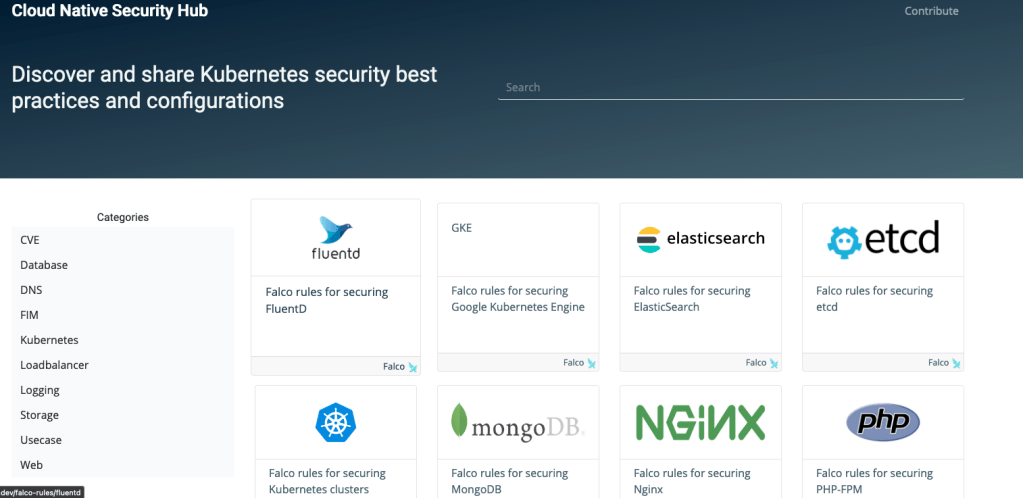
Now we’re going to practice modifying the rules.yaml file and restarting the daemon
/etc/falco/falco_rules.yaml- Adding file integrity monitoring (FIM)
- CVEs in the wild
- Detecting admin activities Falco Rules
- Detecting SSH connections Falco Rules
#Detecting SSH

- rule: Inbound SSH Connection
  desc: Detect Inbound SSH Connection
  condition: >
    ((evt.type in (accept,listen) and evt.dir=<) or
      (evt.type in (recvfrom,recvmsg))) and ssh_port
  output: >
    Inbound SSH connection (user=%user.name client_ip=%fd.cip client_port=%fd.cport server_ip=%fd.sip)
  priority: WARNING
  tags: [network]
- rule: Outbound SSH Connection
  desc: Detect Outbound SSH Connection
  condition: >
    ((evt.type = connect and evt.dir=<) or
      (evt.type in (sendto,sendmsg))) and ssh_port
  output: >
    Outbound SSH connection (user=%user.name server_ip=%fd.sip server_port=%fd.sport client_ip=%fd.cip)
  priority: WARNING
  tags: [network]

#Detecting Admin activity

- rule: Detect su or sudo
  desc: detect sudo activities
  condition:
    spawned_process and proc.name in (sudo, su)
  output: >
    Detected sudo or su privilege escalation activity (user=%user.name command=%proc.cmdline)
  priority: WARNING
  tags: [process]
- rule: Package Management Launched
  desc: detect package management launched
  condition: >
    spawned_process and user.name != "_apt" and package_mgmt_procs and not package_mgmt_ancestor_procs
  output: >
    Package management process launched in container (user=%user.name
    command=%proc.cmdline container_id=%container.id container_name=%container.name image=%container.image.repository:%container.image.tag)
  priority: ERROR
  tags: [process]


# File Integrity Monitoring
- rule: Detect New File
  desc: detect new file created
  condition: >
    evt.type = chmod or evt.type = fchmod
  output: >
    File below a known directory opened for writing (user=%user.name
    command=%proc.cmdline file=%fd.name parent=%proc.pname pcmdline=%proc.pcmdline gparent=%proc.aname[2])
  priority: ERROR
  tags: [filesystem]
- rule: Detect New Directory
  desc: detect new directory created
  condition: >
    mkdir
  output: >
    File below a known directory opened for writing (user=%user.name
    command=%proc.cmdline file=%fd.name parent=%proc.pname pcmdline=%proc.pcmdline gparent=%proc.aname[2])
  priority: ERROR
  tags: [filesystem]
- rule: Detect File Permission or Ownership Change
  desc: detect file permission/ownership change
  condition: >
    spawned_process and proc.name in (chmod, chown) and proc.args contains "/tmp/"
  output: >
    File below a known directory has permission or ownership change (user=%user.name
    command=%proc.cmdline file=%fd.name parent=%proc.pname pcmdline=%proc.pcmdline gparent=%proc.aname[2])
  priority: WARNING
  tags: [filesystem]
- rule: Detect Directory Change
  desc: detect directories change
  condition: >
    spawned_process and proc.name in (mkdir, rmdir, mvdir, mv)
  output: >
    Directory Change in Filesystem (user=%user.name
    command=%proc.cmdline file=%fd.name parent=%proc.pname pcmdline=%proc.pcmdline gparent=%proc.aname[2])
  priority: WARNING
  tags: [filesystem]
- rule: Kernel Module Modification
  desc: detect kernel module change
  condition: >
    spawned_process and proc.name in (insmod, modprobe)
  output: >
    Kernel Module Change (user=%user.name
    command=%proc.cmdline file=%fd.name parent=%proc.pname pcmdline=%proc.pcmdline gparent=%proc.aname[2] result=%evt.res)
  priority: WARNING
  tags: [process]
- rule: Node Created in Filesystem
  desc: detect node created in filesystem
  condition: >
    spawned_process and proc.name = mknod
  output: >
    Node Creation in Filesystem (user=%user.name
    command=%proc.cmdline file=%fd.name parent=%proc.pname pcmdline=%proc.pcmdline gparent=%proc.aname[2] result=%evt.res)
  priority: WARNING
  tags: [filesystem]
- rule: Listen on New Port
  desc: Detection a new port is listening
  condition:
    evt.type = listen
  output: >
    A new port is open to listen (port=%fd.sport ip=%fd.sip)
  priority: WARNING
  tags: [network]


#CVE-2019-14287

- rule: Sudo Potential bypass of Runas user restrictions (CVE-2019-14287)
  desc: When sudo is configured to allow a user to run commands as an arbitrary user via the ALL keyword in a Runas specification, it is possible to run commands as root by specifying the user ID -1 or 4294967295. This can be used by a user with sufficient sudo privileges to run commands as root even if the Runas specification explicitly disallows root access as long as the ALL keyword is listed first in the Runas specification
  condition: >
    spawned_process and
    proc.name="sudo" and
    (proc.cmdline contains "-u#-1" or proc.cmdline contains "-u#4294967295")
  output: "Detect sudo exploit (CVE-2019-14287) (user=%user.name command=%proc.cmdline container=%container.info)"
  priority: CRITICAL


#CVE-2019-11246
- macro: safe_kubectl_version
  condition: (jevt.value[/userAgent] startswith "kubectl/v1.19" or
              jevt.value[/userAgent] startswith "kubectl/v1.18" or
              jevt.value[/userAgent] startswith "kubectl/v1.17" or
              jevt.value[/userAgent] startswith "kubectl/v1.16" or
              jevt.value[/userAgent] startswith "kubectl/v1.15" or
              jevt.value[/userAgent] startswith "kubectl/v1.14.3" or
              jevt.value[/userAgent] startswith "kubectl/v1.14.2" or
              jevt.value[/userAgent] startswith "kubectl/v1.13.7" or
              jevt.value[/userAgent] startswith "kubectl/v1.13.6" or
              jevt.value[/userAgent] startswith "kubectl/v1.12.9")

- rule: K8s Vulnerable Kubectl Copy
  desc: Detect any attempt vulnerable kubectl copy in pod
  condition: kevt_started and pod_subresource and kcreate and
             ka.target.subresource = "exec" and ka.uri.param[command] = "tar" and
             not safe_kubectl_version
  output: Vulnerable kubectl copy detected (user=%ka.user.name pod=%ka.target.name ns=%ka.target.namespace action=%ka.target.subresource command=%ka.uri.param[command] userAgent=%jevt.value[/userAgent])
  priority: WARNING
  source: k8s_audit
  tags: [k8s]


#CVE-2019-5736

- list: docker_binaries
  items: [dockerd, containerd-shim, "runc:[1:CHILD]"]

- macro: docker_procs
  condition: proc.name in (docker_binaries)

- rule: Modify container entrypoint (CVE-2019-5736)
  desc: Detect file write activities on container entrypoint symlink (/proc/self/exe)
  condition: >
    open_write and (fd.name=/proc/self/exe or fd.name startswith /proc/self/fd/) and not docker_procs and container
  output: >
    %fd.name is open to write by process (%proc.name, %proc.exeline)
  priority: WARNING
#reload the rules engine

kill -1 $(cat /var/run/falco.pid)

or

systemctl restart falco

# view the alerts

journalctl -fu falco
Let’s EXEC into the container and run SU and SSH and CHMOD and to confirm the rules work …
Apr 08 20:22:39 worker-2 falco[9456]: 20:22:39.497888159: Warning A new port is open to listen (port=<NA> ip=<NA>)

Apr 08 20:22:39 worker-2 falco[9456]: 20:22:39.497889563: Warning A new port is open to listen (port=<NA> ip=<NA>)

Apr 08 20:22:39 worker-2 falco[9456]: 20:22:39.542561541: Notice A shell was spawned in a container with an attached terminal (user=root user_loginuid=-1 sec-ctx-demo (id=90f13b629bfa) shell=sh parent=runc cmdline=sh terminal=34817 container_id=90f13b629bfa image=docker.io/library/busybox)

Apr 08 20:22:41 worker-2 falco[9456]: 20:22:40.993841222: Error File below a known directory opened for writing (user=root command=containerd file=<NA> parent=systemd pcmdline=systemd gparent=<NA>)

Apr 08 20:22:41 worker-2 falco[9456]: 20:22:40.993856836: Error File below a known directory opened for writing (user=root command=containerd file=<NA> parent=systemd pcmdline=systemd gparent=<NA>)

Apr 08 20:22:43 worker-2 falco[9456]: 20:22:43.552418006: Warning Detected sudo or su privilege escalation activity (user=root command=su)
Apr 08 20:24:12 worker-2 falco[9456]: 20:24:12.852504355: Warning Outbound SSH connection (user=root server_ip=192.168.226.64 server_port=22 client_ip=192.168.133.199)
sending alerts to third party services
From here, we’re going to install an add-on which integrates with Falco and acts as a connector to common third party services. You’ll probably use these third-party services to store and process security alerts for ETL, AI/ML or Dashboards.
Welcome this little goofy thing … Sidekick

- You’ll need HELM installed on the your controller
- You’ll need Falco HELM charts installed installed with HELM
- You’ll need the Sidekick charts installed with HELM
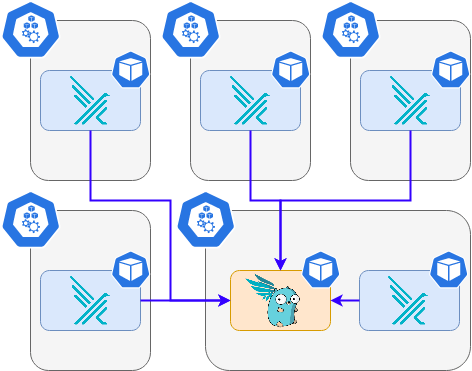
The HELM charts will deploy a SideKick pod for you and you’ll need to configure your Falco daemons falco.yaml to direct traffic to the sidekick listener hosted on your cluster.
#let's do a fresh reinstall of everything

helm uninstall falco -n falco


# You'll also need to set-up your GCP pub/sub and create a service account that is authorizes side-kick to publish events into the topic.


kubectl create namespace falco

helm repo add falcosecurity https://falcosecurity.github.io/charts

helm upgrade -f values.yaml falco falcosecurity/falco --namespace falco --set falcosidekick.enabled=true --set falcosidekick.webui.enabled=true \
NAME: falco
LAST DEPLOYED: Sun Apr 11 21:07:38 2021
NAMESPACE: falco
STATUS: deployed
REVISION: 1
NOTES:
Falco agents are spinning up on each node in your cluster. After a few
seconds, they are going to start monitoring your containers looking for
security issues.
No further action should be required.secsandman@controller:~$ kubectl get pods -o wide
NAME READY STATUS RESTARTS AGE IP NODE NOMINATED NODE READINESS GATES
falcosidekick-5c696d7fd8-jpbwf 1/1 Running 0 14m 192.168.133.206 worker-2 <none> <none>
falcosidekick-5c696d7fd8-r7drx 1/1 Running 0 14m 192.168.133.207 worker-2 <none> <none>
falcosidekick-ui-5b7f44849b-ppx6m 1/1 Running 0 14m 192.168.133.205 worker-2 <none> <none>
# Reminder, the below Web Application port is unauthenticated, I'm only doing this in dev with a bastion host, network ACLs and MFA enabled
secsandman@controller:~$ kubectl port-forward --address 0.0.0.0 svc/falco-falcosidekick-ui 2802 -n falco &
secsandman@controller:~$ curl -s http://localhost:2801/ping
Handling connection for 2801
pong
secsandman@controller:~$ curl -X POST -sI http://localhost:2801/test
Handling connection for 2801
HTTP/1.1 200 OK
Date: Sun, 11 Apr 2021 21:26:30 GMT
Content-Length: 0
We’re going to download a linux enumeration “audit” tool and use it to behave a bit like local malware and see whether Falco alerts.
# Exec into one of your containers/pods within your test environment

[ root@my-pod:/ ]$  curl https://raw.githubusercontent.com/rebootuser/LinEnum/master/LinEnum.sh >> LinEnum.sh


[ root@my-pod:/ ]$ chmod +x LinEnum.sh

[ root@my-pod:/ ]$ ./LinEnum.sh -e ./real-bad.txt
detecting events using native web ui
Falco comes with an insecure Web Interface that you can optionally deploy as part of your test / troubleshooting. There is no authentication or encryption in transit is disabled by default. In my development environment, I’m using a bastion host with network ACLs to enforce authentication but the ideally you would forward to a more enterprise ready Web Application or you could modify the vue.js controller with an authentication node.js module yourself.
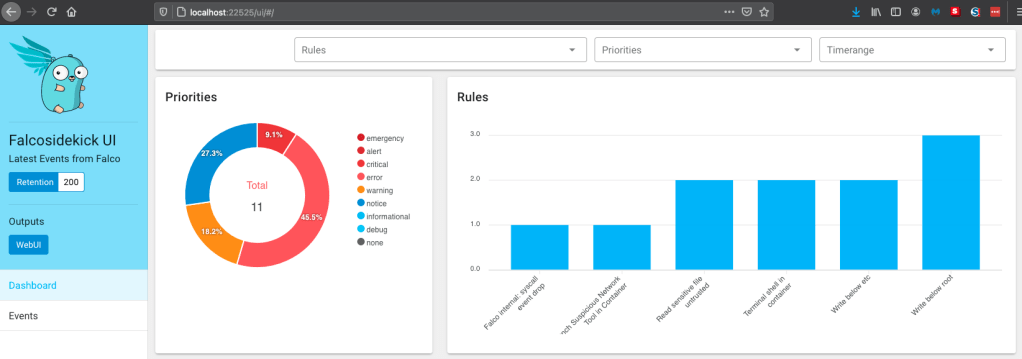
As you can see, the local “malware” aka the linux enumeration scripts lit up the Falco sensors which in return forwarded the logs over to the native Web UI. You can drill down into the events to better understand each event.

Additionally, you can extend these security events to a variety of other services for ingestion into your existing Incident Response / CIRT pipelines.
- Slack
- Rocketchat
- Mattermost
- Teams
- Datadog
- Discord
- AlertManager
- Elasticsearch
- Loki
- NATS
- STAN (NATS Streaming)
- Influxdb
- AWS Lambda
- AWS SQS
- AWS SNS
- AWS CloudWatchLogs
- AWS S3
- SMTP (email)
- Opsgenie
- StatsD (for monitoring of
falcosidekick) - DogStatsD (for monitoring of
falcosidekick) - Webhook
- Azure Event Hubs
- Prometheus (for both events and monitoring of
falcosidekick) - GCP PubSub
- GCP Storage
- Google Chat
- Apache Kafka
- PagerDuty
- Kubeless
- OpenFaaS
- WebUI (a Web UI for displaying latest events in real time)

 @secSandman