Microsoft Ignite 2025: Mapping the M365 + Azure Attack Surface to the New AI Security Stack
I spent the part of a week reading through the Microsoft Ignite 2025 announcements and honestly? The trend is interesting. AI this, AI that.
Instead of the usual marketing fluff about “unified platforms” and “AI-powered everything,” Microsoft actually dropped some AI capabilities that might be useful if you’re a big Microsoft shop but failed to deliver agnostic cross platform feature IMO.
So instead of regurgitating the press releases, I’m going to do map the attack surface first, then overlay the controls.
Let’s dig in.
Table of Contents
- tl;dr but RTFM
- The M365 + Azure Attack Surface (2025 Edition)
- Complete Attack Surface Diagram
- Threat Vectors Mapped to MITRE ATT&CK
- New Microsoft Controls Overlay
- Engineering Deep Dive
- Resources: Docs, APIs, YouTube, GitHub
- So What? Actionable Takeaways
The M365 + Azure Attack Surface (2025 Edition)
Before we talk about Microsoft’s shiny new toys, let’s map out what attackers are actually targeting.
I’ve broken this into four layers because that’s how the kill chains tend to flow.
Identity Attack Surface
Identity is still the #1 entry point. Microsoft reported a 32% increase in identity-based attacks in 2025.
Here’s the attack surface:

Traditional MFA is getting bypassed left and right. Adversary-in-the-middle (AiTM) attacks using tools like Evilginx2 are stealing session tokens before MFA even completes.
And once attackers have a valid token, they’re inside.
Email Attack Surface
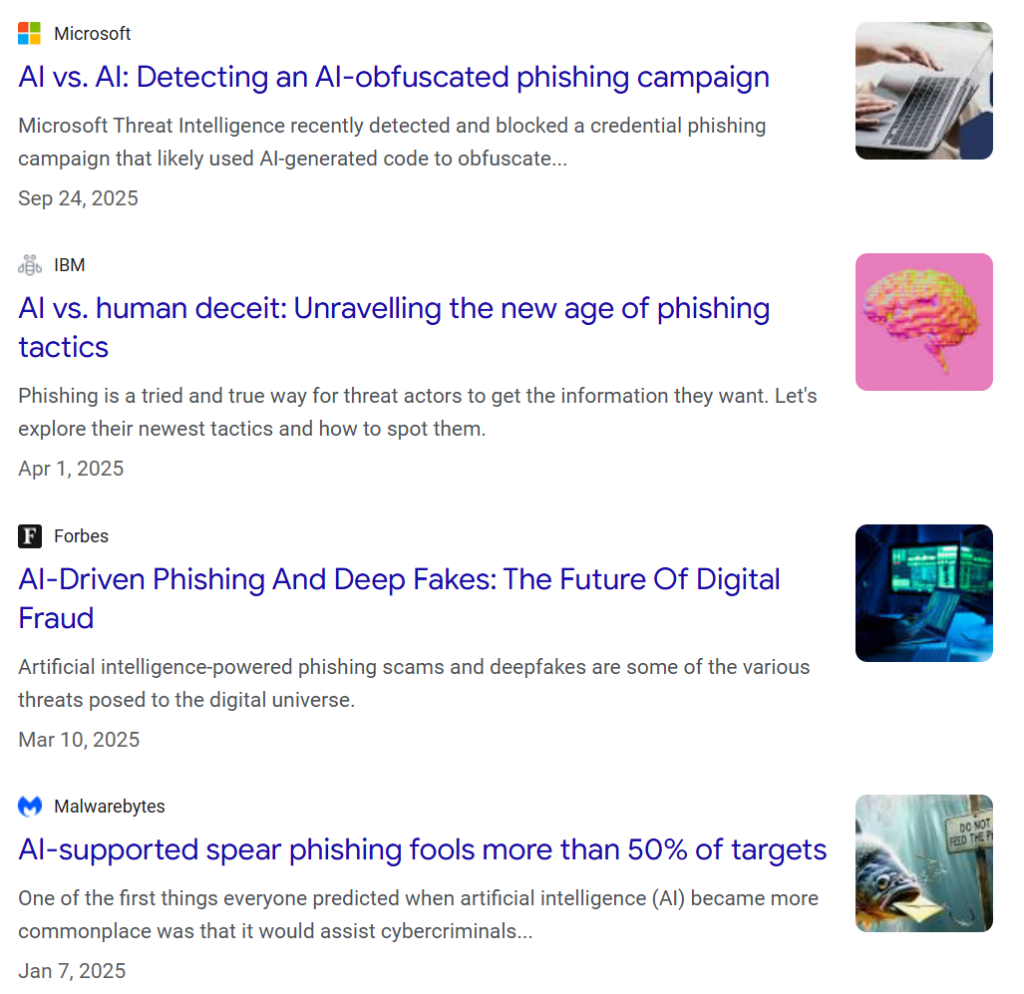
Email remains the primary initial access vector. Microsoft sees 54% click-through rates on AI-generated phishing vs 12% for human-crafted.

Cloud Infrastructure Attack Surface
This is where things get spicy. Multi-cloud is the norm now and attackers are pivoting across AWS, Azure, and GCP like it’s nothing.

80% of advanced attacks are now multi-stage. Attackers gain initial access via identity or phishing, then pivot laterally through cloud infrastructure. Traditional perimeter security is useless here.
AI Agent Attack Surface (NEW)
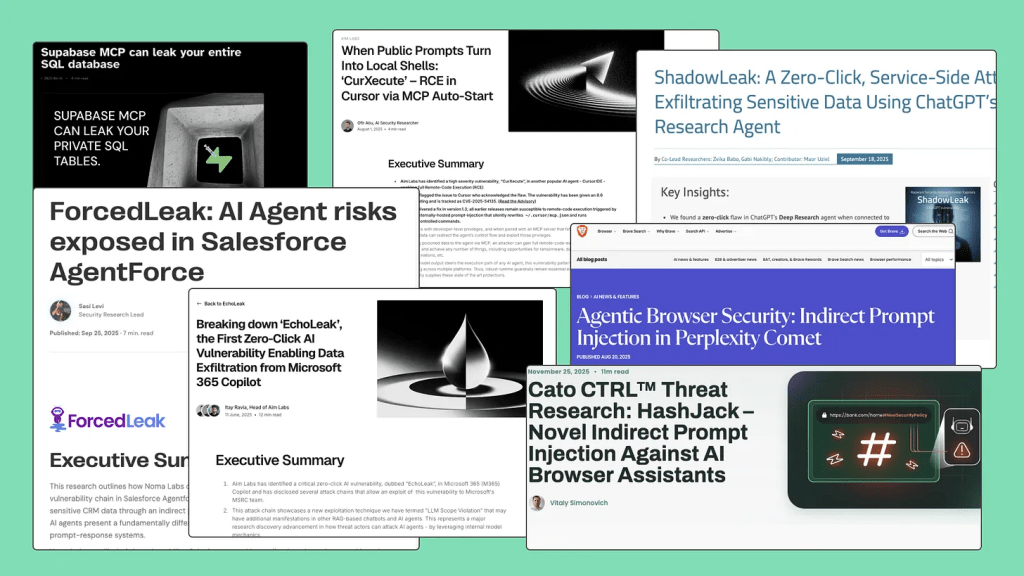
source: https://securetrajectories.substack.com/p/your-ai-agent-just-got-pwned
This is the new frontier. Microsoft predicts 1.3 billion AI agents by 2028.
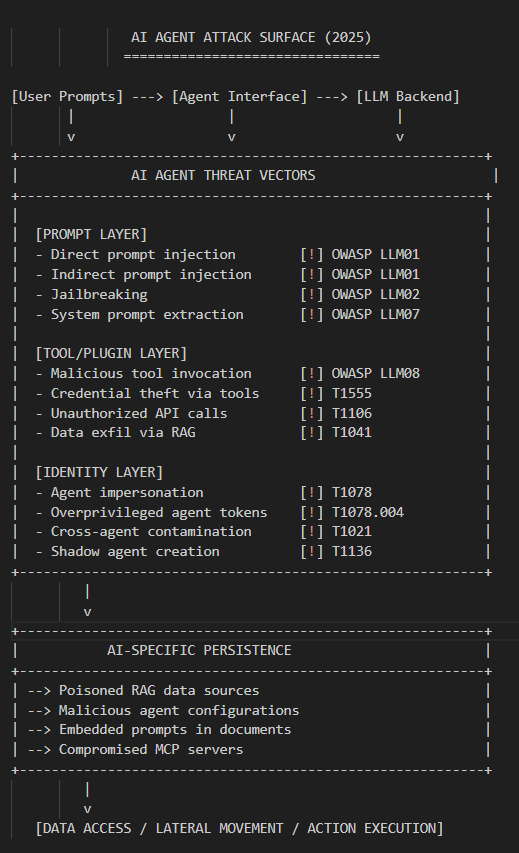
Most orgs have zero visibility into what these agents are doing.
Widespread across developer workstations, built into remote process (RPA) automation, service now, across clouds and Kubernetes runtimes.
Most orgs are deploying AI agents without any identity governance. These agents have OAuth tokens, API keys and access to sensitive data, and nobody knows what permissions they actually have.
Let alone what tools and actions they can call and I’m not even considering the multiplier effect of agent-2-agent design patterns.
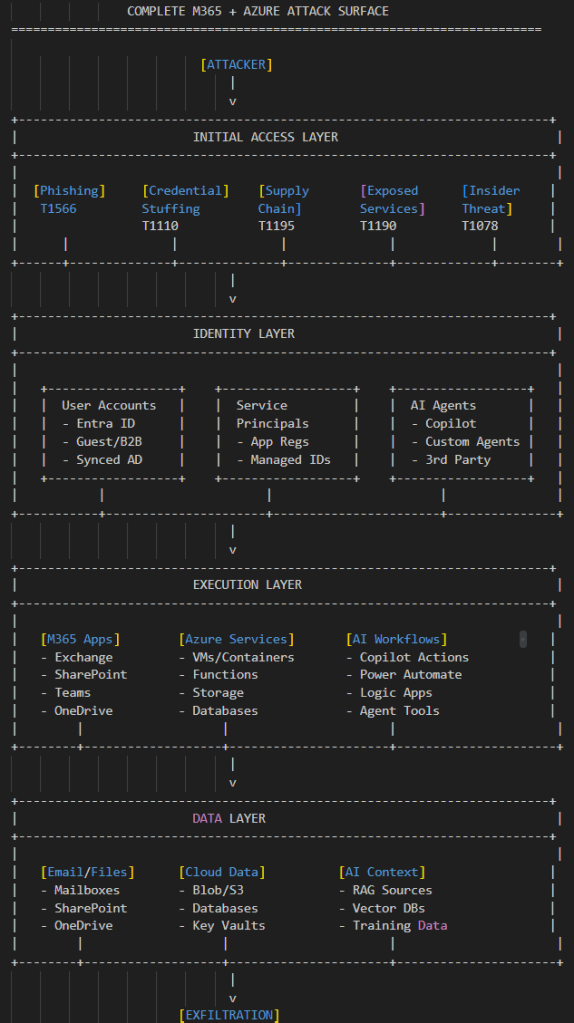
Complete Attack Surface Diagram
Here’s how it all connects. This is the picture I wish I had when I started threat modeling M365 environments and AI threats.
New Microsoft Controls Overlay
Now let’s map the Ignite 2025 announcements to these attack surfaces.
Identity Controls: Entra Agent ID + Syncable Passkeys
Syncable Passkeys – This seems legit. Cross-device passkey sync means users can actually use phishing-resistant auth without hardware tokens. Microsoft claims 14x faster auth (3 seconds vs 69 seconds for password+MFA).
More importantly, it mitigates AiTM attacks because there’s no password to steal.
Entra Agent ID – This is a gap. AI agents finally get first-class identity treatment within the Microsoft realm.
- Unique object IDs in Entra
- Scoped permissions via “Agent Identity Blueprints”
- Conditional Access support
- Full audit logging
Detection Controls: Predictive Shielding + Security Copilot Agents
Predictive Shielding – Microsoft claims 99%+ confidence before taking automatic action. It proactively hardens attack paths (GPO, Safeboot, protocol-level blocks) before attackers pivot. This is the a move towards a reactive SOAR.
Automatic Attack Disruption Extension – Now works with AWS, Proofpoint, and Okta data via Sentinel. This means cross-cloud containment, which is huge for hybrid environments.
Security Copilot Agents – Four new agents:
- Phishing Triage Agent: 550% faster email processing
- Alert Triage Agent: Autonomous Level-1 analysis
- Threat Hunting Agent: Natural language to KQL
- Dynamic Threat Detection Agent: Finds false negatives
AI Governance: Agent 365 + Foundry Control Plane
Agent 365 – A way to discover “shadow agents” that business units deployed without IT approval. Think of it like a CASB for AI agents.
AI Prompt Shield – Network-level prompt injection protection. This deploys at the Azure Front Door layer, meaning you can protect even third-party AI apps.
Security Dashboard for AI – Single pane of glass for AI risk. CISOs can finally answer “how exposed are we to AI-related risks?”
Engineering Deep Dive
Alright, let’s get into the code. This is the stuff that actually matters if you’re going to implement any of this.
Entra Agent ID SDK Implementation
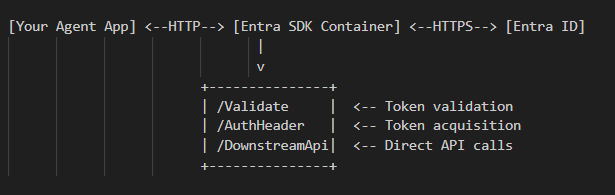
The Microsoft Entra SDK for AgentID is a containerized web service that handles token acquisition and validation for agents. Here’s how to set it up:
Architecture:
Kubernetes Deployment:
# agent-id-sdk-deployment.yaml
apiVersion: apps/v1
kind: Deployment
metadata:
  name: entra-agent-sdk
spec:
  replicas: 2
  selector:
    matchLabels:
      app: entra-agent-sdk
  template:
    spec:
      containers:
      - name: sdk
        image: mcr.microsoft.com/entra/agent-id-sdk:latest
        env:
        - name: AzureAd__Instance
          value: "https://login.microsoftonline.com/"
        - name: AzureAd__TenantId
          valueFrom:
            secretKeyRef:
              name: entra-secrets
              key: tenant-id
        - name: AzureAd__ClientId
          valueFrom:
            secretKeyRef:
              name: entra-secrets
              key: client-id
        ports:
        - containerPort: 8080
Python Agent Example:
import requests
from typing import Optional

class EntraAgentClient:
    """Client for interacting with Entra Agent ID SDK"""

    def __init__(self, sdk_url: str = "http://localhost:8080"):
        self.sdk_url = sdk_url

    def validate_token(self, token: str) -> dict:
        """Validate an incoming token"""
        response = requests.get(
            f"{self.sdk_url}/Validate",
            headers={"Authorization": f"Bearer {token}"}
        )
        response.raise_for_status()
        return response.json()

    def get_auth_header_for_graph(
        self,
        agent_identity: str,
        user_token: Optional[str] = None
    ) -> str:
        """Get authorization header for downstream API calls"""
        headers = {}
        if user_token:
            headers["Authorization"] = f"Bearer {user_token}"

        response = requests.get(
            f"{self.sdk_url}/AuthorizationHeader/Graph",
            params={"AgentIdentity": agent_identity},
            headers=headers
        )
        response.raise_for_status()
        return response.text

    def call_graph_api(
        self,
        agent_identity: str,
        endpoint: str,
        user_token: Optional[str] = None
    ) -> dict:
        """Call Microsoft Graph API on behalf of agent"""
        auth_header = self.get_auth_header_for_graph(
            agent_identity,
            user_token
        )

        response = requests.get(
            f"https://graph.microsoft.com/v1.0/{endpoint}",
            headers={"Authorization": auth_header}
        )
        response.raise_for_status()
        return response.json()


# Usage example
client = EntraAgentClient()

# Autonomous agent pattern (app-only)
users = client.call_graph_api(
    agent_identity="12345678-1234-1234-1234-123456789012",
    endpoint="users"
)

# Interactive agent pattern (on-behalf-of user)
my_profile = client.call_graph_api(
    agent_identity="12345678-1234-1234-1234-123456789012",
    endpoint="me",
    user_token="eyJ0eXAiOiJKV1Q..."
)
Custom Detection Rules with KQL
Here are some KQL queries to detect attacks against the surfaces we mapped above:
Detect AiTM Phishing Attacks:
// Detect potential Adversary-in-the-Middle attacks
// Look for sign-ins where session token was used from

different IP
let timeframe = 1h;
let threshold = 2;
SigninLogs
| where TimeGenerated > ago(timeframe)
| where ResultType == 0  // Successful sign-in
| summarize
    IPCount = dcount(IPAddress),
    IPs = make_set(IPAddress),
    Locations = make_set(Location)
    by UserPrincipalName, CorrelationId
| where IPCount >= threshold
| extend
    AlertTitle = "Potential AiTM - Multiple IPs Same Session",
    MITREtechnique = "T1557"
Detect Suspicious AI Agent Activity:
// Monitor for unusual AI agent OAuth token usage

let lookback = 24h;
let baseline = 7d;
CloudAppEvents
| where TimeGenerated > ago(lookback)
| where Application contains "Copilot" or
        Application contains "Agent" or
        Application contains "Bot"
| summarize
    CurrentCount = count(),
    UniqueResources = dcount(ObjectName)
    by Application, AccountId
| join kind=leftouter (
    CloudAppEvents
    | where TimeGenerated between (ago(baseline) .. ago(lookback))
    | summarize BaselineCount = count() by Application, AccountId
) on Application, AccountId
| extend
    Deviation = (CurrentCount - BaselineCount) / todouble(BaselineCount) * 100
| where Deviation > 200 or BaselineCount == 0
| extend AlertTitle = "Anomalous AI Agent Activity"
Detect OAuth App Consent Phishing:
// Detect suspicious OAuth app consents

AuditLogs
| where TimeGenerated > ago(7d)
| where OperationName == "Consent to application"
| extend
    AppDisplayName = tostring(TargetResources[0].displayName),
    Permissions = tostring(TargetResources[0].modifiedProperties)
| where Permissions contains "Mail.Read" or
        Permissions contains "Files.ReadWrite" or
        Permissions contains "User.Read.All"
| summarize
    ConsentCount = count(),
    Users = make_set(InitiatedBy.user.userPrincipalName)
    by AppDisplayName
| where ConsentCount > 5  // Multiple users consenting to same app
| extend
    AlertTitle = "Potential OAuth Consent Phishing",
    MITREtechnique = "T1566.002"
Detect Inbox Rule Persistence:
// Detect malicious inbox rules for persistence
OfficeActivity
| where TimeGenerated > ago(24h)
| where Operation == "New-InboxRule" or
        Operation == "Set-InboxRule"
| extend
    RuleName = tostring(parse_json(Parameters)[0].Value),
    Actions = tostring(Parameters)
| where Actions contains "DeleteMessage" or
        Actions contains "MoveToFolder" or
        Actions contains "ForwardTo" or
        Actions contains "RedirectTo"
| project
    TimeGenerated,
    UserId,
    RuleName,
    Actions,
    ClientIP
| extend
    AlertTitle = "Suspicious Inbox Rule Created",
    MITREtechnique = "T1137.005"
- Bert-JanP/Hunting-Queries-Detection-Rules
- microsoft/Microsoft-365-Defender-Hunting-Queries
- LearningKijo/KQL
Resources: Docs, APIs, YouTube, GitHub
Official Microsoft Documentation
| Resource | URL |
|---|---|
| Entra Agent ID | https://learn.microsoft.com/en-us/entra/agent-id/ |
| Agent ID SDK | https://learn.microsoft.com/en-us/entra/msidweb/agent-id-sdk/overview |
| Security Copilot | https://learn.microsoft.com/en-us/copilot/security/ |
| Defender XDR Custom Detections | https://learn.microsoft.com/en-us/defender-xdr/custom-detection-rules |
| Graph Security API | https://developer.microsoft.com/en-us/graph |
| M365 Copilot APIs | https://learn.microsoft.com/en-us/microsoft-365-copilot/extensibility/copilot-apis-overview |
GitHub Repositories
| Repository | Description |
|---|---|
| Bert-JanP/Hunting-Queries-Detection-Rules | Massive KQL query library with MITRE mapping |
| microsoft/Microsoft-365-Defender-Hunting-Queries | Official Microsoft hunting queries |
| LearningKijo/KQL | Out-of-the-box XDR hunting queries |
| jaraguayo/KQL-Queries | Defender XDR threat hunting |
Ignite 2025 Sessions to Watch
| Session | Topic |
|---|---|
| BRK235 | Power Agentic Defense with Microsoft Sentinel |
| THR749 | Scale operations and optimize costs with Sentinel data lake |
| THR748 | Leveraging Microsoft Sentinel SIEM and data lake |
| Keynote | Security segment with Vasu Jakkal and Charlie Bell |
Third-Party Analysis
| Source | URL |
|---|---|
| Security Risk Advisors | https://sra.io/blog/microsoft-ignite-2025-the-6-security-announcements-shaping-2026/ |
| MITRE Center for Threat-Informed Defense | https://ctid.mitre.org/projects/security-stack-mappings-microsoft-365/ |
| KQL Query Blog | https://kqlquery.com |
So What? Actionable Takeaways
Look, I know this is a lot. Here’s what you should actually do:
Immediate (This Week)
Inventory your AI agents – Run a discovery to find all OAuth apps and service principals with AI-related permissions. You probably have shadow agents you don’t know about.
Enable Unified Audit Log – If you haven’t already, turn on Defender XDR audit integration. You can’t detect what you can’t see.
Review passkey rollout timeline – If you’re on E5, syncable passkeys should be on your radar for Q1 2026.
Short-Term (Next Quarter)
Deploy Entra Agent ID for new agents – Don’t deploy any new AI agents without proper identity governance.
Build baseline KQL queries – Use the queries above to establish detection coverage for AI-related threats.
Evaluate Security Copilot allocation – If you’re E5, you’re getting 400 SCUs per 1000 users. Figure out how to use them.
Long-Term (2026 Planning)
Architect for Agent 365 – Plan your agent governance strategy. Which agents need human approval? Which can operate autonomously?
Build custom Copilot plugins – If you have internal threat intel or custom data sources, start building integration plugins now.
Closing Thoughts
Microsoft dropped a lot at Ignite 2025. Some of it is marketing fluff, but the AI agent governance capabilities are genuinely useful if you’re wrestling with the “AI sprawl” problem that most enterprises are facing.
The key insight is this: identity is the new perimeter, and AI agents are the new service accounts. If you’re not governing them with the same rigor you apply to human identities, you’re building technical debt that attackers will exploit.
The attack surface isn’t shrinking. But at least now we have better tools to map it, monitor it and (hopefully) defend it.

Tags: microsoft-ignite, m365-security, azure-security, ai-agents, entra-id, defender-xdr, sentinel, security-copilot, threat-modeling, attack-surface

 @secSandman