Overview
This article documents the security architecture behind an enterprise SSO federation system built for my personal SaaS solution prototype, a multi-tenant AI agent orchestration system where tenant isolation isn’t just a feature, it’s the foundational security property for users and agents.

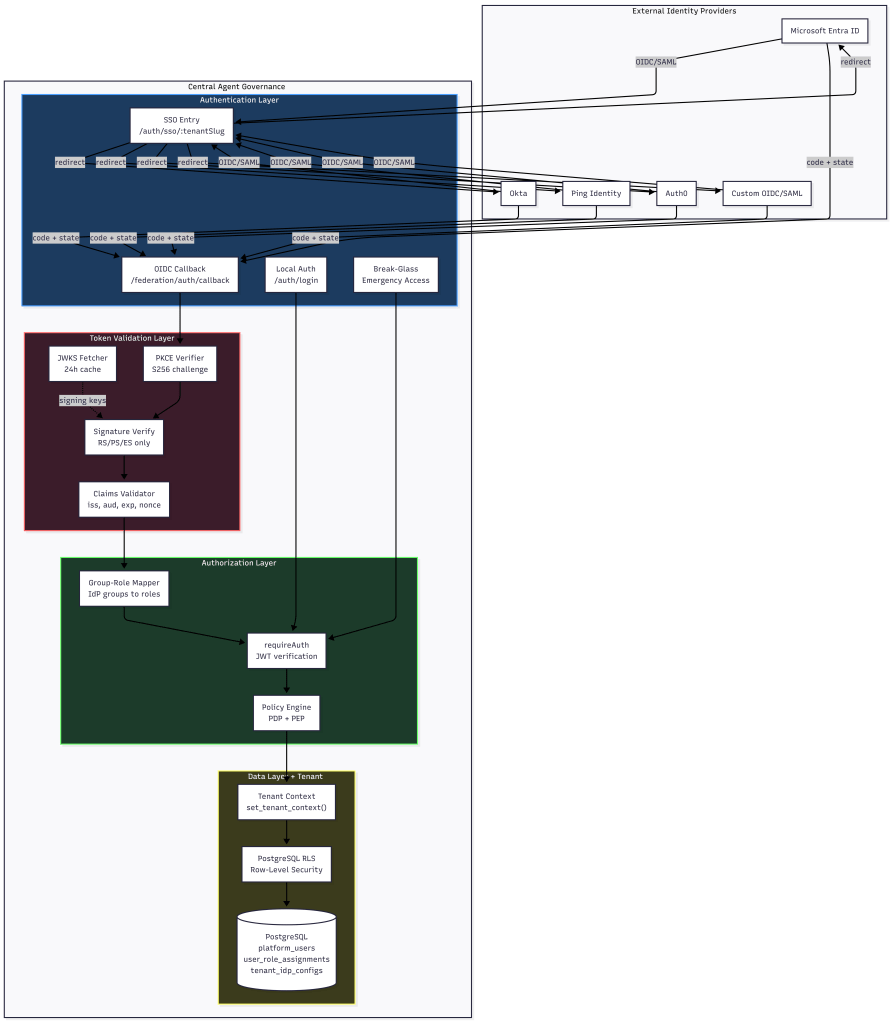
From day one of my prototyping, system was built to support OIDC and SAML federation with Microsoft Entra ID, Okta, Ping Identity, Auth0, and custom providers. Every SSO login flows through seven security validation stages before a user touches any tenant resource. Nearly every api enforcing authentication, authorization and logging.
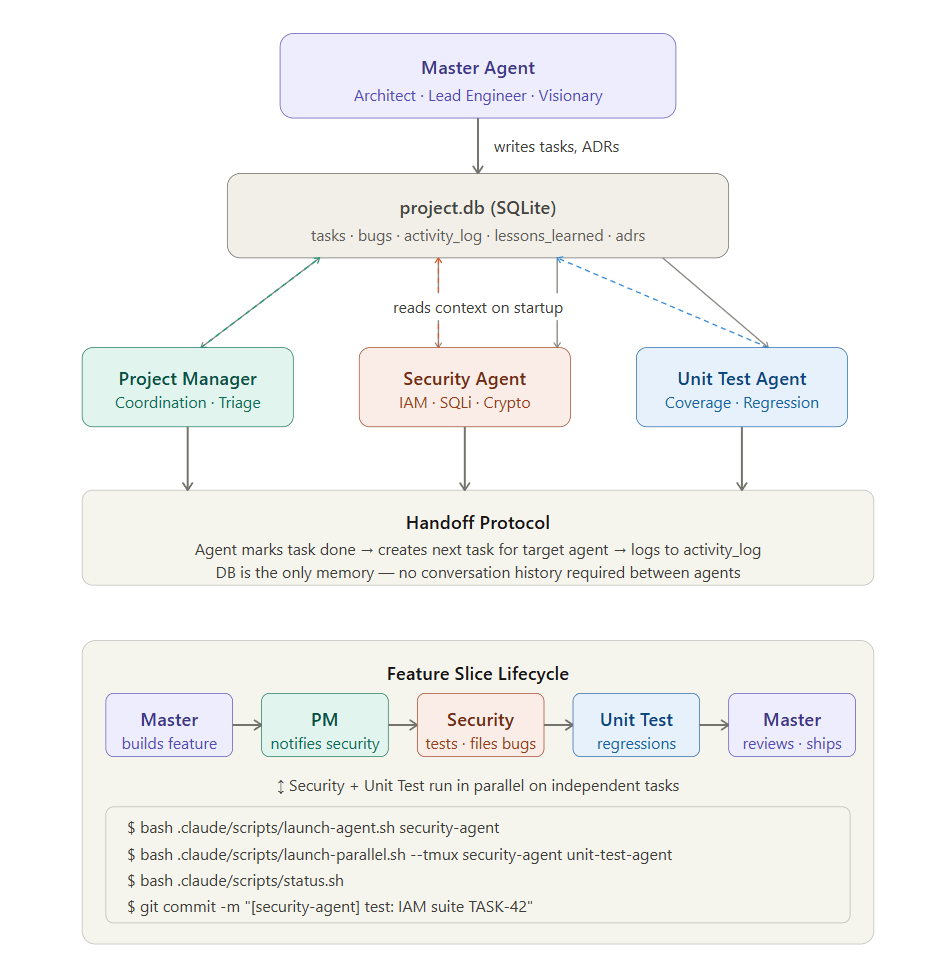
In future posts, I plan to expand this project into a multi-agent vulnerability, security testing and patch life-cycle. The thought is to experiment automating the development and security life cycle as much as possible while creating rapid prototype.
Until then, figured I’d document a IAM lessons learned.
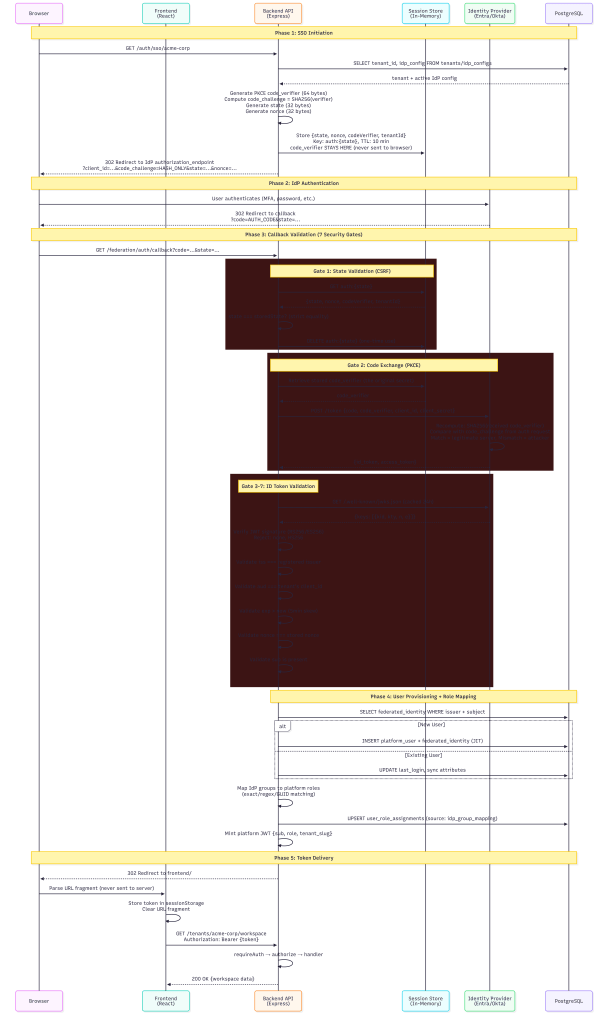
The SSO Authentication Chain
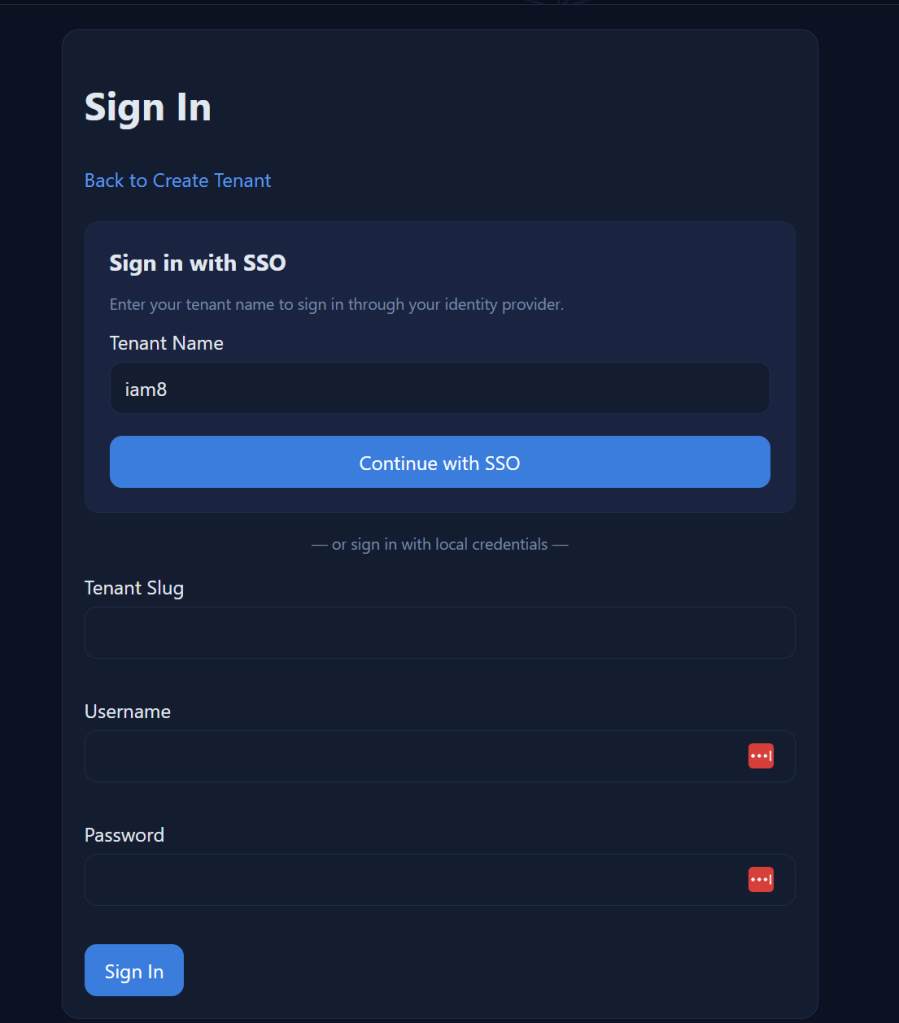
When a user clicks “Sign in with SSO”, here’s what happens behind the scenes:
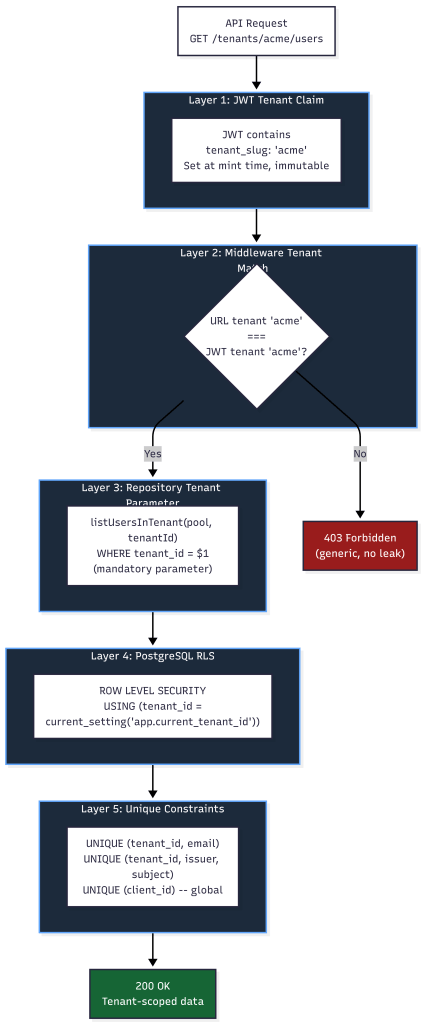
Multi Tenancy Flow
Every step in this chain is designed to be a security gate. If any gate fails, the request is denied.
Token Validation: Seven Claims That Must Pass
The OIDC token validator performs signature verification and claims validation in strict order. No shortcuts.
### Signature Verification
Tokens are verified against the IdP’s published JSON Web Key Set (JWKS):
- JWKS keys are fetched from the IdP’s `jwks_uri` with a 24-hour cache TTL
- If the signing key ID (`kid`) isn’t found in cache, the validator force-refreshes before failing
- Only asymmetric algorithms are accepted: RS256, RS384, RS512, PS256, PS384, PS512, ES256, ES384, ES512
– **Explicitly rejected**: `none` algorithm (CVE-2015-9235), and all symmetric algorithms (HS256/384/512) — these would allow anyone with the client_secret to forge tokens
Claims Validation
After signature verification, seven claims are validated:
| Claim | What It Checks | Why It Matters ||-------|---------------|----------------|| `iss` (Issuer) | Must match the registered IdP issuer URL exactly (case-insensitive, trailing-slash normalized) | Prevents tokens from rogue IdPs being accepted || `aud` (Audience) | Must match the tenant's registered `client_id` | **Primary tenant isolation mechanism** — a token issued for Tenant A's client_id cannot authenticate against Tenant B || `exp` (Expiration) | Token must not be expired (5 min clock skew tolerance) | Prevents use of stale/stolen tokens || `iat` (Issued At) | Token must not be issued in the future | Detects clock manipulation || `nbf` (Not Before) | Token must be valid at current time | Prevents premature token use || `nonce` | Must match the nonce stored in the session state | Prevents token replay attacks || `sub` (Subject) | Must be present and non-empty | Required for user identification |
If any claim fails validation, the entire authentication is rejected with a specific error code (`INVALID_CLAIMS`, `EXPIRED_TOKEN`, `NONCE_MISMATCH`, etc.). The error response to the client is generic (“invalid token from IdP”) — specific failure reasons are only logged server-side.
Audience Validation as Tenant Isolation
The `aud` claim deserves special attention. In a multi-tenant system, each tenant registers their own `client_id` with their identity provider. The `tenant_idp_configs` table enforces a global unique constraint on `client_id`:
```sqlCONSTRAINT uq_client_id UNIQUE (client_id)```
This means no two tenants can share a client_id. When the IdP issues an ID token, the `aud` claim contains that tenant’s specific client_id. The validator checks it against the expected audience for the requesting tenant. A token issued for Tenant A’s Entra app registration simply cannot pass audience validation when presented to Tenant B’s callback endpoint.
PKCE and State: Preventing Authorization Code Attacks
PKCE (Proof Key for Code Exchange)
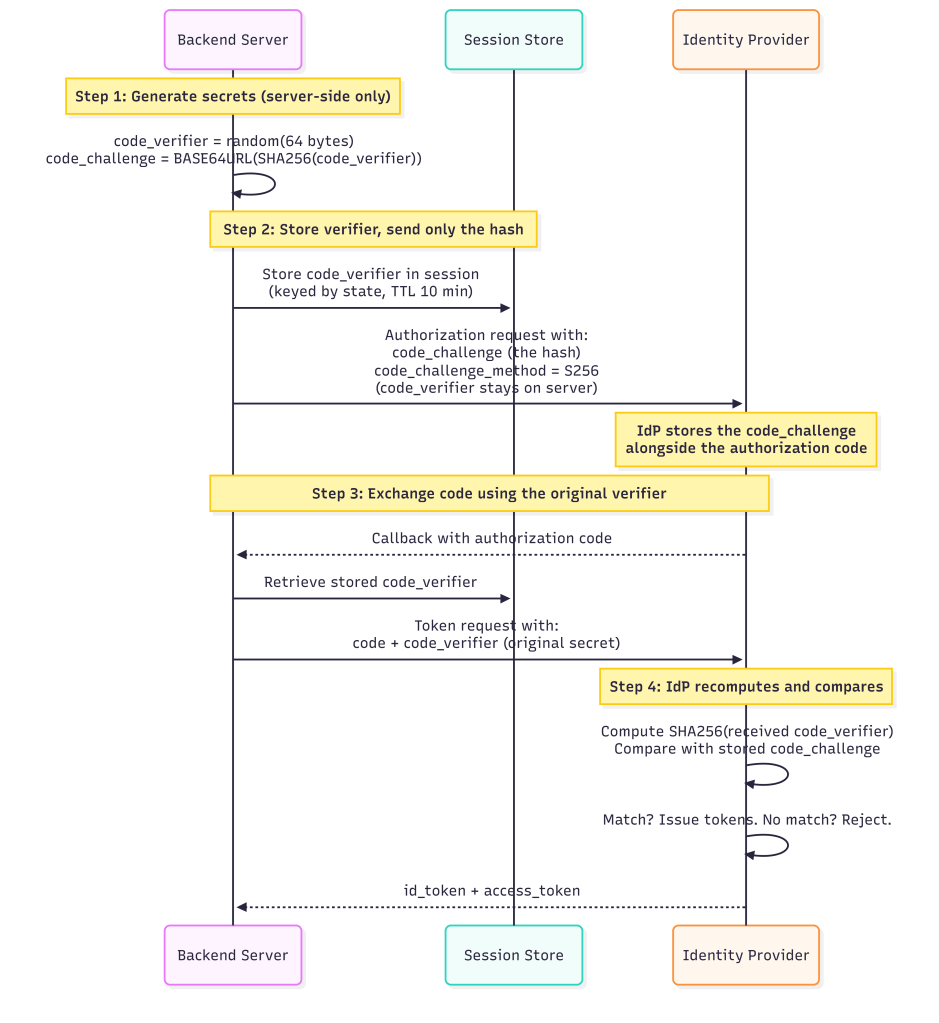
This mitigates authorization code interception attacks, even if an attacker captures the `code` from the callback URL when performing MiTM or dns hijacking, they can’t exchange it without the `code_verifier` on the local app.
State Parameter (CSRF Protection)
The `state` parameter is a 32-byte cryptographically random value generated per login attempt:
- Stored server-side in a session store keyed by `auth:{state}`
- Session state has a **10-minute TTL** but configurable, expired states are rejected
- After successful callback, the session state is **immediately deleted** (one-time use)
- State is validated with strict equality: `request.state === storedState`
Nonce (Replay Prevention)
A separate 32-byte `nonce` value is generated and stored alongside the state. The nonce is included in the authorization request and must appear in the returned ID token’s `nonce` claim. This prevents:
- Token replay attacks (reusing a valid token from a previous session)
- Token substitution attacks (swapping in a token from a different flow)
The Auth Middleware Chain: No Endpoint Left Unprotected
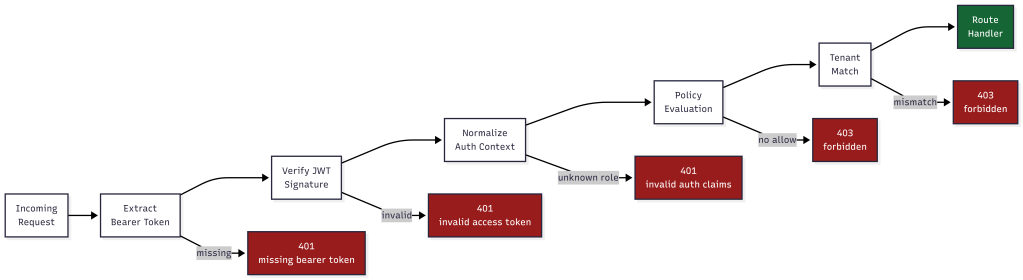
Every protected API endpoint passes through a two-stage middleware chain before the route handler executes:
Stage 1: requireAuth
```Request → Extract Bearer token → Verify JWT signature → Normalize auth context → Set req.auth```
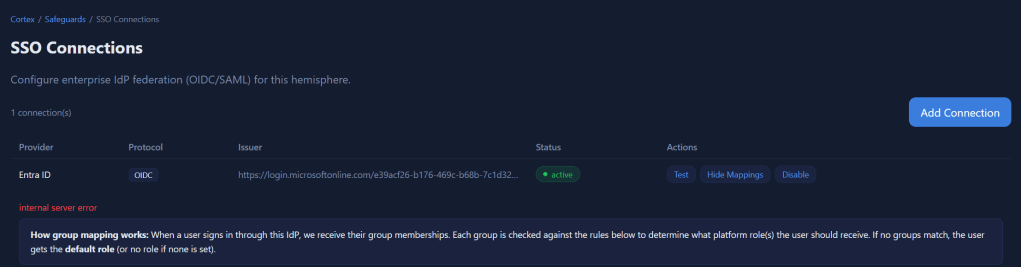
The `normalizeAuthContext` function extracts three critical fields from the JWT claims:
- `actorId` — from `sub` or `actor_id` claim
- `actorRole` — from `role` or `roles[0]` claim
- `tenantSlug` — from `tenant_slug` claim (lowercased)
The role is validated against a known set of platform roles. If the role doesn’t exist in `ROLE_PERMISSIONS`, the entire auth context is rejected, the request gets a 401, not a degraded permission set. This is why adding the `tenant_member` role was critical for federated SSO users.
Stage 2: authorize (Policy Engine)
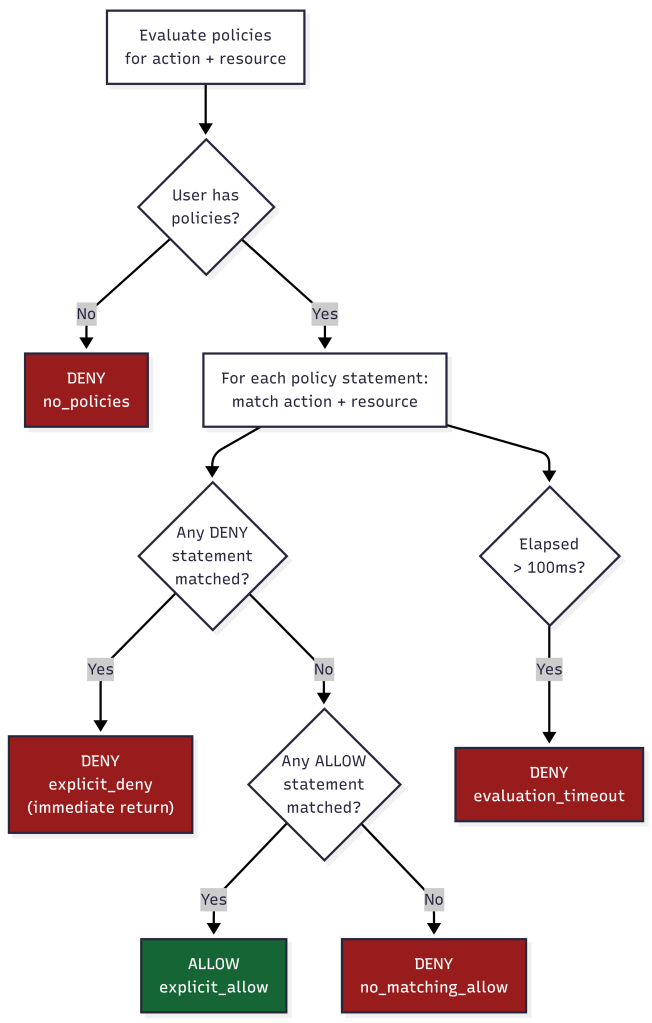
The new policy-based authorization middleware evaluates every request against the policy decision point:
- Resolves the action (explicit or auto-detected from HTTP method)
- Resolves the resource path (explicit pattern or from `req.path`)
- Looks up built-in policies for the user’s role
- If policies exist: evaluates with deny-wins precedence and 100ms timeout
- If no policies: falls back to legacy `ROLE_PERMISSIONS` check
Deny-by-Default
The policy evaluator implements strict deny-by-default semantics:
- No matching policy → **DENY**
- Matching allow + matching deny on same resource → **DENY** (deny wins)
- Only matching allow with no matching deny → **ALLOW**
- Evaluation timeout (>100ms) → **DENY**
There is no “default allow” path. If the system can’t determine authorization within the time limit, it fails secure.
Multi-Tenancy Security: Five Layers of Isolation
### Layer 1: JWT Tenant Claim
The platform access token embeds `tenant_slug` as a claim. This is set at token minting time from the database and it cannot be modified by the client. The `requirePermission` and `authorize` middleware both read the tenant from the JWT, never from request parameters.
### Layer 2: Middleware Tenant Match
For non-platform-admin roles, every request’s URL tenant slug is compared against the JWT’s tenant claim:
if (req.auth.tenantSlug !== expectedTenantSlug) { return res.status(403).json({ error: "forbidden" });}
A user authenticated for Tenant A cannot access Tenant B’s endpoints even if they manipulate the URL. The 403 response is generic so no indication of whether the tenant exists or not.
### Layer 3: Repository-Level Tenant Parameters
Every database query function requires `tenantId` as a mandatory parameter:
async function listUsersInTenant(pool, tenantId, options) { // tenantId is ALWAYS a WHERE clause parameter const conditions = ["pu.tenant_id = $1"]; // ...}
This is defense-in-depth. Even if middleware fails, the query itself is tenant-scoped. Functions that omit `tenantId` throw: `”tenantId is required (security)”`.
### Layer 4: Row-Level Security (RLS)
PostgreSQL RLS policies enforce tenant isolation at the database engine level:
ALTER TABLE platform_users ENABLE ROW LEVEL SECURITY;CREATE POLICY platform_users_tenant_isolation_selectON platform_users FOR SELECTUSING ( tenant_id = current_setting('app.current_tenant_id', true)::uuid OR current_setting('app.is_platform_admin', true) = 'true');
Every request sets the tenant context via `set_tenant_context(tenantId, isPlatformAdmin)` before executing queries. Even raw SQL injection would be scoped to the current tenant’s rows.
RLS is enabled on: `platform_users`, `federated_user_identities`, `user_role_assignments`, `root_accounts`, `root_account_mfa_methods`, and `tenant_idp_configs`.
### Layer 5: Unique Constraints
Database constraints prevent cross-tenant collision:
- `(tenant_id, email)` uniqueness on `platform_users` — same email can exist in different tenants
- `(tenant_id, external_issuer, external_subject_id)` on `federated_user_identities` — same IdP user mapped per-tenant
- `(client_id)` globally unique on `tenant_idp_configs` — prevents audience confusion
## Group-to-Role Mapping: Automated RBAC from IdP Claims
When a user authenticates via SSO, the IdP sends their group memberships in the token claims. The group-role mapper translates these into platform roles.
### How Mapping Works
Each IdP configuration stores a `group_role_mapping` JSON document:
{ "mappings": [ { "idp_group": "Platform-Admins", "platform_role": "tenant_admin", "match_type": "exact", "priority": 10 }, { "idp_group": "team-.*-developers", "platform_role": "tenant_operator", "match_type": "regex", "priority": 50 } ], "default_role": "tenant_member", "multi_role_strategy": "highest_privilege", "unmapped_group_action": "ignore"}
### Match Types
| Type | Behavior | Use Case ||------|----------|----------|| `exact` | Case-sensitive string equality | Named groups like "Platform-Admins" || `regex` | Regular expression test | Pattern groups like "team-.*-admins" || `guid` | Case-insensitive UUID comparison | Azure AD group Object IDs |
### Multi-Role Strategy
When a user belongs to multiple groups that map to different roles:
- **highest_privilege**: Only the most powerful role is assigned. Safest option — prevents accidental privilege stacking and lockout.
- **merge**: All matched roles are assigned. Use when users genuinely need permissions from multiple groups.
- **first_match**: Stops at the first matching group (by priority order). Predictable but less flexible.
### Tenant-Scoped Mapping
Group mappings are always evaluated with tenant context:
mapGroupsToRoles(userGroups, groupMappingConfig, { context: { tenantId, idpConfigId }})
This prevents **IdP group confusion attacks**: if Tenant A and Tenant B both have a group called “Admins” in their respective IdP configurations, the group name “Admins” only maps to a role within the context of the tenant whose IdP config was used for authentication.
### Role Sync with Source Tracking
Role assignments are stored with their source:
INSERT INTO user_role_assignments (user_id, tenant_id, role_id, source, source_details)VALUES ($1, $2, $3, 'idp_group_mapping', '{"idp_groups": ["Platform-Admins"]}')
The `source` column (`manual`, `idp_group_mapping`, `default`, `scim`) allows the system to:
- Distinguish admin-assigned roles from IdP-synced roles
- Re-sync IdP roles on login without overwriting manual assignments
- Audit where each role came from
Protecting Against Common Multi-Tenant Attacks
Query String Parameter Injection
**Attack**: Attacker modifies `?tenantSlug=victimTenant` in the URL to access another tenant’s data.
**Mitigation**: The tenant identity comes from the JWT `tenant_slug` claim, not from URL parameters. The middleware compares the URL parameter against the JWT claim and rejects mismatches with a generic 403. Even if the URL is manipulated, the JWT is signed and cannot be modified.
IDOR (Insecure Direct Object Reference)
**Attack**: User A guesses User B’s UUID and accesses `/tenants/acme/users/{userBId}`.
**Mitigation**: Every query includes `WHERE tenant_id = $1`, so User B’s record is only returned if they belong to the same tenant. RLS provides a second enforcement layer at the database level. Self-modification prevention blocks users from modifying their own roles.
Authorization Code Replay
**Attack**: Attacker intercepts and replays an OAuth authorization code.
**Mitigation**: PKCE ensures the code is useless without the `code_verifier`. The `AuthorizationCodeTracker` in the security hardening module SHA256-hashes and tracks used codes with a 10-minute TTL. Reuse triggers an `AUTH_CODE_REUSE_ATTEMPT` audit event.
Token Replay
**Attack**: Attacker captures a valid token and replays it in a different session.
**Mitigation**: Nonce validation ties each token to a specific authentication session. The `JtiTracker` records JWT IDs (JTI) and rejects duplicates within 24 hours. Replay attempts trigger `TOKEN_REPLAY_DETECTED` audit events.
Cross-Tenant Token Reuse
**Attack**: User authenticated for Tenant A presents their token to Tenant B’s API endpoints.
**Mitigation**: Five layers prevent this:
- Audience claim validation (different client_id per tenant)
- JWT tenant_slug claim checked against URL tenant
- Repository functions require tenantId parameter
- PostgreSQL RLS policies scope all queries
- Database unique constraints prevent data collision
### Certificate and Key Weaknesses
**Attack**: IdP uses weak signing keys or expired certificates.
**Mitigation**: The certificate validator rejects RSA keys under 2048 bits and EC keys under P-256. SHA-1 and MD5 signature algorithms are rejected. Certificate expiry warnings fire at 30 days and go critical at 7 days, logged as `CERT_EXPIRY_WARNING` audit events.
## Audit Trail
Every security-relevant action is logged as a structured audit event:
{ "timestamp": "2026-04-01T14:32:01.123Z", "eventType": "SSO_LOGIN_SUCCESS", "eventCategory": "authentication", "severity": "info", "details": { "provider": "entra_id", "isNewUser": false, "role": "tenant_admin" }, "context": { "tenantId": "uuid", "userId": "uuid", "requestId": "correlation-id", "sourceIp": "10.0.0.1" }}
Sensitive fields (passwords, tokens, secrets, authorization codes, code verifiers) are automatically sanitized before logging. The audit logger covers 20+ event types across authentication flows, security violations, IdP configuration changes, and user provisioning.
What’s Next
As I continue to build my protype multi-tenant SaaS AI platform, I plan to accelerate my work by incorporating multi-agent and subagent systems to coordinate basic unit testing and security testing. While I may regret this later, initially I’m planning scaling my work with something as follows.


 @secSandman