Overview
Most security failures in multi-tenant SaaS aren’t dramatic. They’re quiet. A recycled database connection carries the wrong tenant’s context into the next request. A JWT validator trusts a URL the attacker supplied in the token header. A logout endpoint clears the local session and leaves the identity provider session running. None of these look wrong until they are.

This article documents the IAM architecture I built to mitigate exactly these failure when building enterprise SSO federation across Microsoft Entra ID, Okta, Ping Identity, Auth0 and custom providers, with tenant isolation enforced at the JWT, middleware, query and database engine layers simultaneously.
It also documents where the architecture fell short during development, what the attack looked like in each case, and what the fix was. It is not a blueprint for a finished system. It is an honest record of building one iteratively, with the mistakes left in and fixes applied.
Disclaimer: While there is much here in the way of good practices, I don’t want to give the illusion that the approaches are perfect. Where I’ve found mistake during iterative development, I added a lessons learned.
Simple Tenant SSO Page
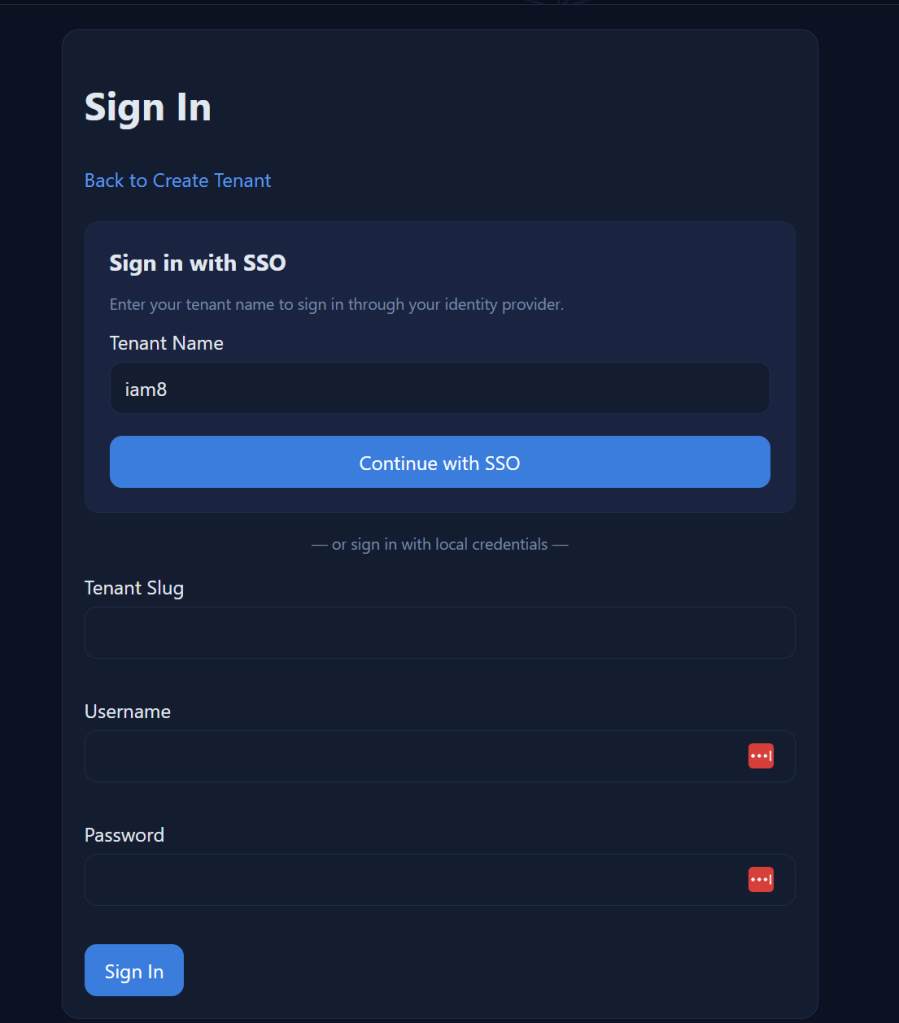
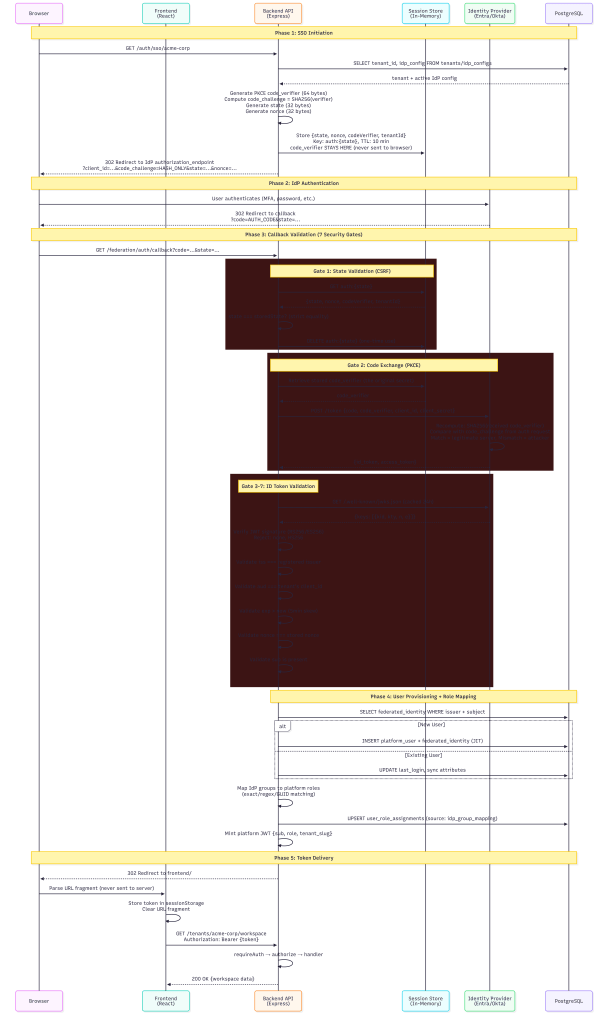
When a user clicks “Sign in with SSO”, here’s what happens behind the scenes:
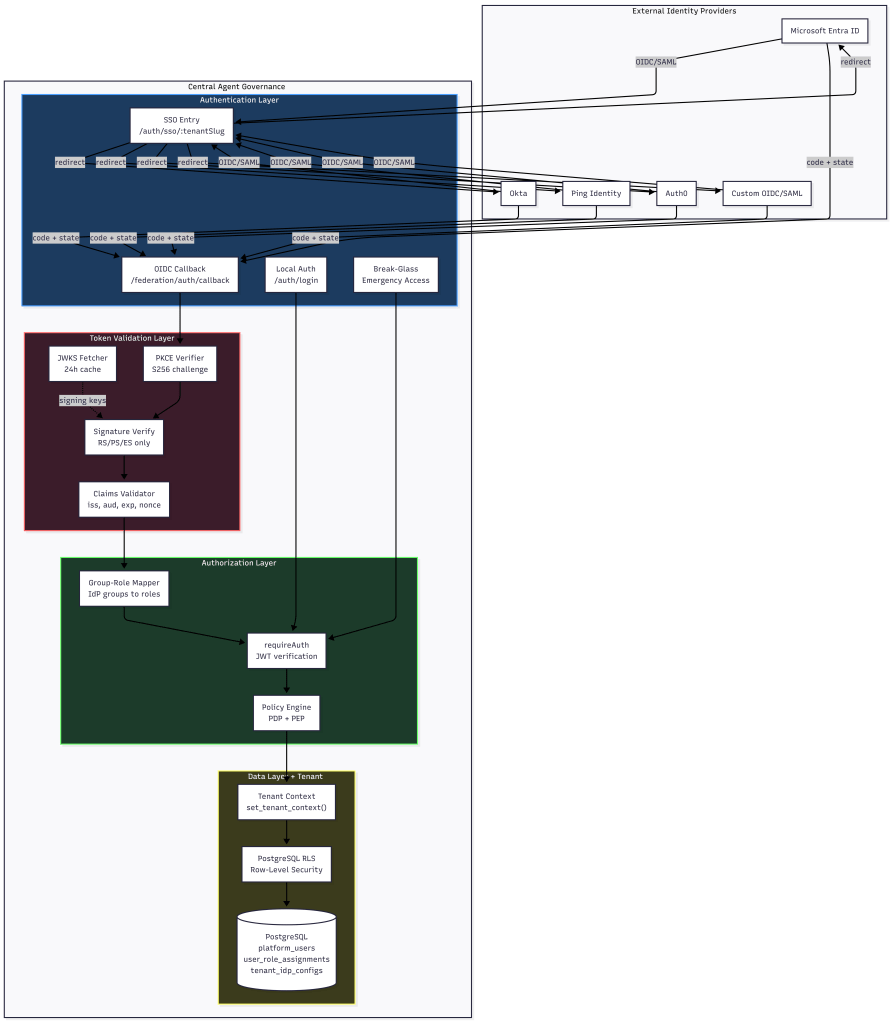
Multi Tenancy Flow
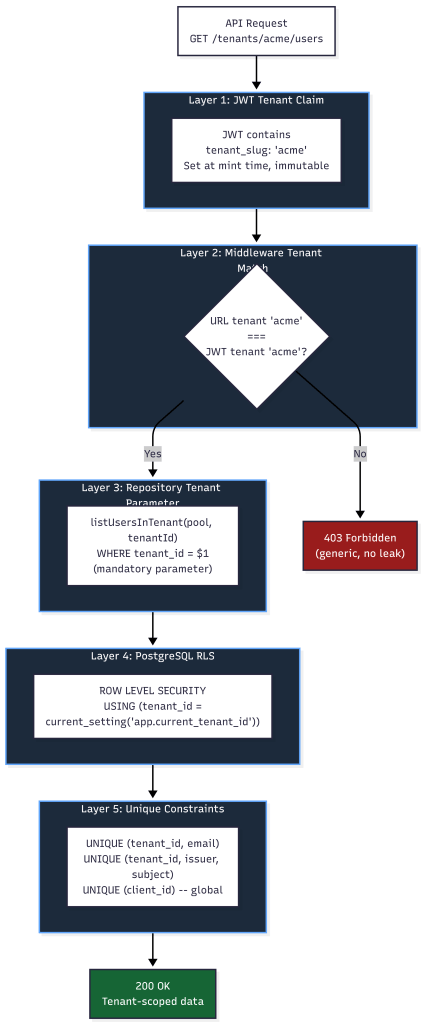
Every step in this chain is designed to be a security gate. If any gate fails, the request is denied.
Token Validation: Seven Claims That Must Pass
The OIDC token validator performs signature verification and claims validation in strict order. No shortcuts.
Signature Verification
Tokens are verified against the IdP’s published JSON Web Key Set (JWKS):
- JWKS keys are fetched from the IdP’s `jwks_uri` with a 24-hour cache TTL
- If the signing key ID (`kid`) isn’t found in cache, the validator force-refreshes before failing
- Only asymmetric algorithms are accepted: RS256, RS384, RS512, PS256, PS384, PS512, ES256, ES384, ES512
Explicitly rejected: `none` algorithm (CVE-2015-9235), and all symmetric algorithms (HS256/384/512) — these would allow anyone with the client_secret to forge tokens

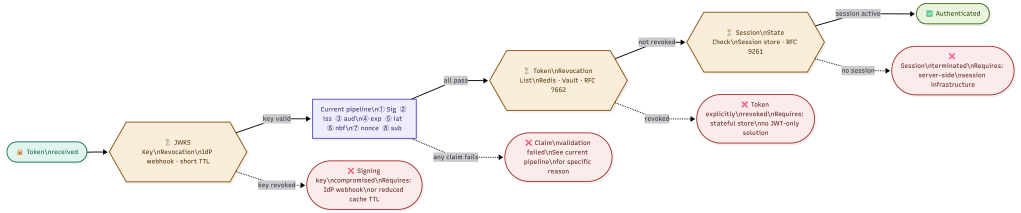
NOTE (Future): My initial JWKS cache force-refreshes when an unknown kid appears, which handles key rotation correctly. However, it does not handle key revocation.
If and when an IdP revokes a signing key due to compromise, tokens signed with that key will continue to be accepted for up to 24 hours until the cache expires. A future improvement will explore, platform has built ability to revoke all previous assigned tokens. subscribing to IdP webhook events for key revocation or reducing the cache TTL for high-security tenants and documenting the incident response procedure if a signing key compromise is reported by an IdP.
Claims Validation
After signature verification, seven claims are validated:
| Claim | What It Checks | Why It Matters ||-------|---------------|----------------|| `iss` (Issuer) | Must match the registered IdP issuer URL exactly (case-insensitive, trailing-slash normalized) | Prevents tokens from rogue IdPs being accepted || `aud` (Audience) | Must match the tenant's registered `client_id` | **Primary tenant isolation mechanism** — a token issued for Tenant A's client_id cannot authenticate against Tenant B || `exp` (Expiration) | Token must not be expired (5 min clock skew tolerance) | Prevents use of stale/stolen tokens || `iat` (Issued At) | Token must not be issued in the future | Detects clock manipulation || `nbf` (Not Before) | Token must be valid at current time | Prevents premature token use || `nonce` | Must match the nonce stored in the session state | Prevents token replay attacks || `sub` (Subject) | Must be present and non-empty | Required for user identification |
If any claim fails validation, the entire authentication is rejected with a specific error code (`INVALID_CLAIMS`, `EXPIRED_TOKEN`, `NONCE_MISMATCH`, etc.). The error response to the client is generic (“invalid token from IdP”) — specific failure reasons are only logged server-side.

Audience Validation as Tenant Isolation
The `aud` claim deserves special attention. In a multi-tenant system, each tenant registers their own `client_id` with their identity provider. The `tenant_idp_configs` table enforces a global unique constraint on `client_id`:
CONSTRAINT uq_client_id UNIQUE (client_id)
This means no two tenants can share a client_id. When the IdP issues an ID token, the `aud` claim contains that tenant’s specific client_id. The validator checks it against the expected audience for the requesting tenant. A token issued for Tenant A’s Entra app registration simply cannot pass audience validation when presented to Tenant B’s callback endpoint.
PKCE and State: Preventing Authorization Code Attacks
PKCE (Proof Key for Code Exchange)
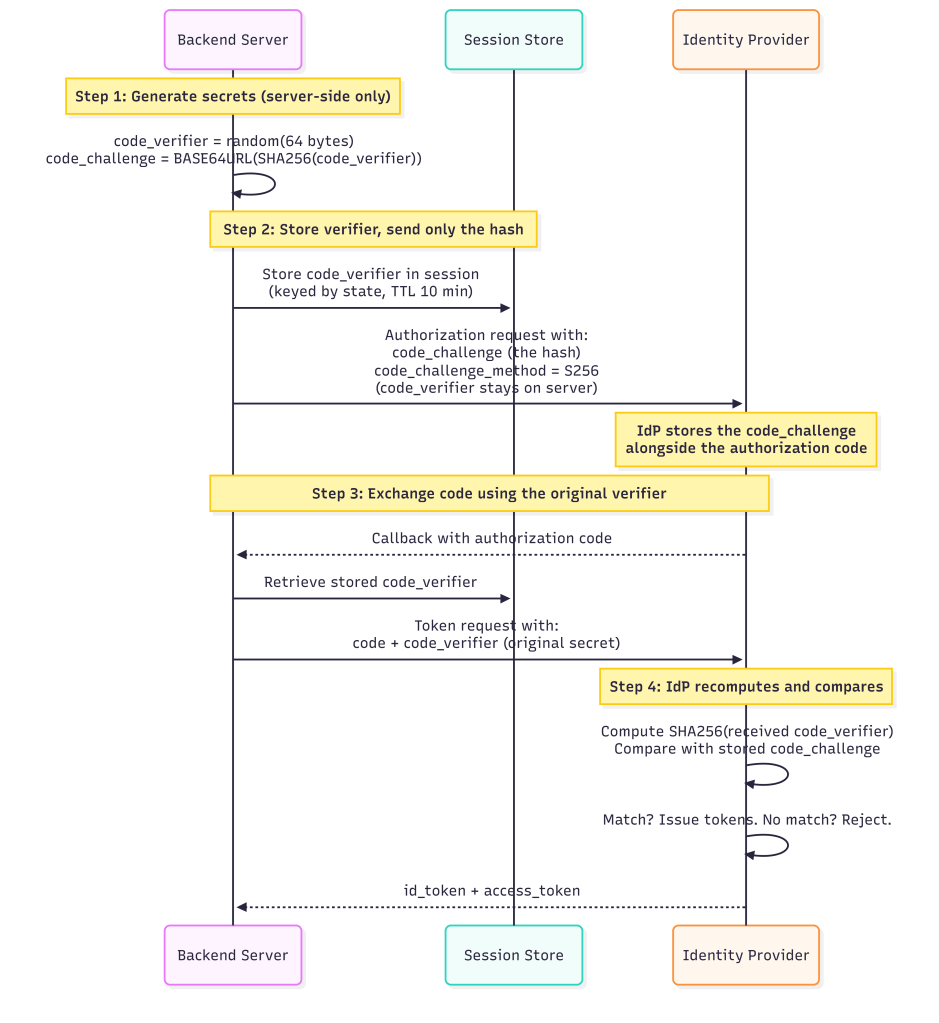
This mitigates authorization code interception attacks, even if an attacker captures the `code` from the callback URL when performing MiTM or dns hijacking, they can’t exchange it without the `code_verifier` on the local app.
State Parameter (CSRF Protection)
The `state` parameter is a 32-byte cryptographically random value generated per login attempt:
- Stored server-side in a session store keyed by `auth:{state}`
- Session state has a **10-minute TTL** but configurable, expired states are rejected
- After successful callback, the session state is **immediately deleted** (one-time use)
- State is validated with strict equality: `request.state === storedState`
Nonce (Replay Prevention)
A separate 32-byte `nonce` value is generated and stored alongside the state. The nonce is included in the authorization request and must appear in the returned ID token’s `nonce` claim. This prevents:
- Token replay attacks (reusing a valid token from a previous session)
- Token substitution attacks (swapping in a token from a different flow)
The Auth Middleware Chain: No Endpoint Left Unprotected
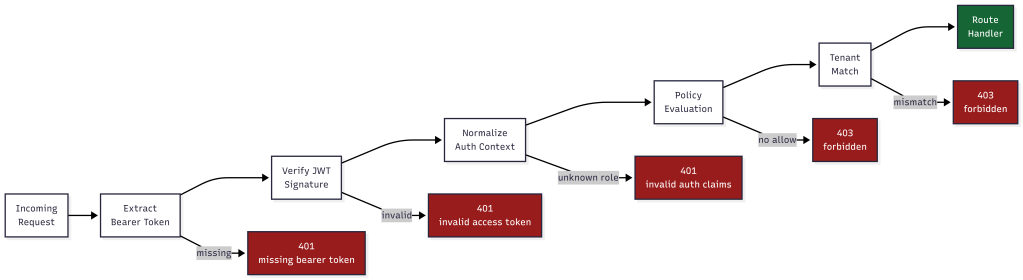
Every protected API endpoint passes through a two-stage middleware chain before the route handler executes:
Stage 1: requireAuth
```Request → Extract Bearer token → Verify JWT signature → Normalize auth context → Set req.auth```
Stage 2: authorize (Policy Engine)
The new policy-based authorization middleware evaluates every request against the policy decision point:
- Resolves the action (explicit or auto-detected from HTTP method)
- Resolves the resource path (explicit pattern or from `req.path`)
- Looks up built-in policies for the user’s role
- If policies exist: evaluates with deny-wins precedence and 100ms timeout
- If no policies: falls back to legacy `ROLE_PERMISSIONS` check
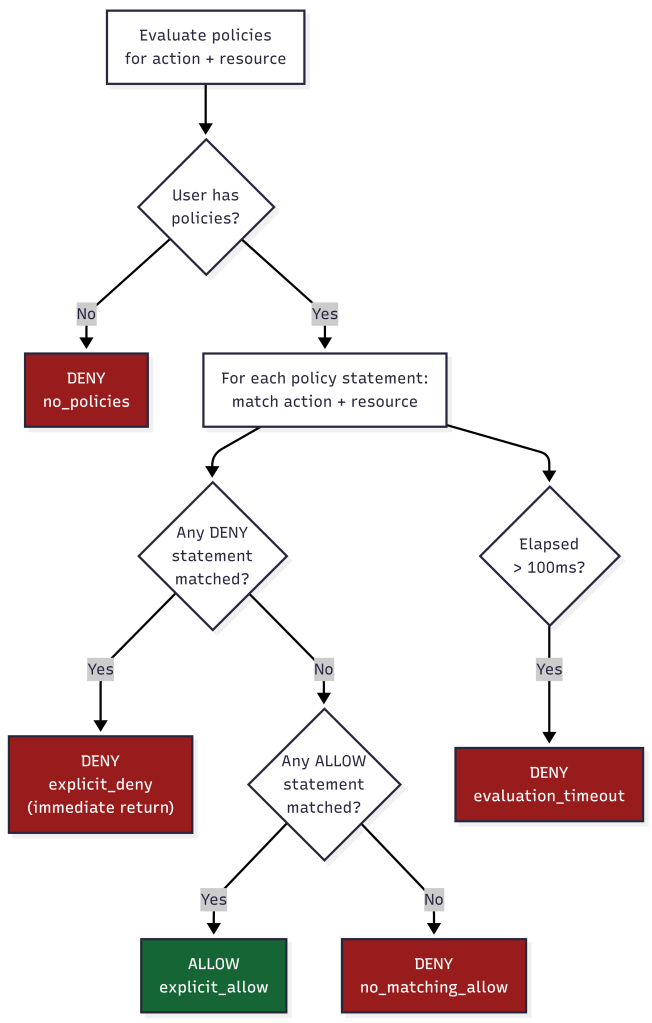
Key Consideration: The current policy engine falls back to the native built-in IAM roles ROLE_PERMISSIONS check when no custom policies are found. While this maintains backward compatibility to support both custom policy framework, it creates two authorization code paths and risks silent fail-open behavior during misconfiguration or deployment issues. This is similar to AWS have “managed” roles vs you applying custom customer managed roles.
Deny-by-Default
The policy evaluator implements strict deny-by-default semantics:
- No matching policy → **DENY**
- Matching allow + matching deny on same resource → **DENY** (deny wins)
- Only matching allow with no matching deny → **ALLOW**
- Evaluation timeout (>100ms) → **DENY**
There is no “default allow” path. If the system can’t determine authorization within the time limit, it fails secure.
Multi-Tenancy Security: Five Layers of Isolation
### Layer 1: JWT Tenant Claim
The platform access token embeds `tenant_slug` as a claim. This is set at token minting time from the database and it cannot be modified by the client. The `requirePermission` and `authorize` middleware both read the tenant from the JWT, never from request parameters.
### Layer 2: Middleware Tenant Match
For non-platform-admin roles, every request’s URL tenant slug is compared against the JWT’s tenant claim:
if (req.auth.tenantSlug !== expectedTenantSlug) { return res.status(403).json({ error: "forbidden" });}
A user authenticated for Tenant A cannot access Tenant B’s endpoints even if they manipulate the URL. The 403 response is generic so no indication of whether the tenant exists or not.
### Layer 3: Repository-Level Tenant Parameters
Every database query function requires `tenantId` as a mandatory parameter:
async function listUsersInTenant(pool, tenantId, options) { // tenantId is ALWAYS a WHERE clause parameter const conditions = ["pu.tenant_id = $1"]; // ...}
This is defense-in-depth. Even if middleware fails, the query itself is tenant-scoped. Functions that omit `tenantId` throw: `”tenantId is required (security)”`.
### Layer 4: Row-Level Security (RLS) – Risk
At first, I started with more traditional approach using row level security, but this database decision led into IAM security issues. PostgreSQL RLS policies enforce tenant isolation at the database engine level:
ALTER TABLE platform_users ENABLE ROW LEVEL SECURITY;CREATE POLICY platform_users_tenant_isolation_selectON platform_users FOR SELECTUSING ( tenant_id = current_setting('app.current_tenant_id', true)::uuid OR current_setting('app.is_platform_admin', true) = 'true');
Every request was sets the tenant context via `set_tenant_context(tenantId, isPlatformAdmin)` before executing queries.
RLS provides meaningful defense-in-depth, but it DOES NOT prevent SQL injection by itself. Important caveats: if injection allows execution of SET app.current_tenant_id = 'other-tenant-uuid', the attacker defeats RLS entirely. If the application’s database role has BYPASSRLS privilege or is a superuser (common in dev configs that drift to production), RLS is not enforced at all.
Lesson Learned: Connection Pooling and RLS Session Variables
PostgreSQL row-level security relies on session-level variables (app.current_tenant_id, app.is_platform_admin) set by set_tenant_context(). In connection-pooled environments pgBouncer in transaction mode or Node.js pg pool connections may be recycled between requests. A recycled connection retains the previous request’s session variables until they are explicitly overwritten.
To prevent tenant context from leaking across requests, always set the tenant context inside the same database transaction as your queries, never as a standalone session-level SET before acquiring a pooled connection. Using SET LOCAL (transaction-scoped) instead of SET (session-scoped) enforces this at the PostgreSQL level and is the recommended approach for any application using a connection pool.
BEGIN;SET LOCAL app.current_tenant_id = '...';SET LOCAL app.is_platform_admin = 'false';-- your queries hereCOMMIT;
Failure to do this is one of the most common ways multi-tenant RLS deployments silently break in production. Additionally, although not covered here, to further mitigate from sql injection one must apply layered controls using input validation and restricted sql account permissions.
Future Consideration – Separate DB between Tenants
It dawned on me, that a more mature, isolated approach would involve not just applying the changes and recommendation above, but also applying a physically separate database per Tenant. That way, assuming our IAM controls are working, a SQL injection success may be bound to only that tenants environment. While the front-end may appear multi-tenant, back-end should follow a more traditional security zoning strategy which opens a few other options for data security and performance as well.
Layer 5: Unique Constraints
Database constraints prevent cross-tenant collision:
- `(tenant_id, email)` uniqueness on `platform_users` — same email can exist in different tenants
- `(tenant_id, external_issuer, external_subject_id)` on `federated_user_identities` — same IdP user mapped per-tenant
- `(client_id)` globally unique on `tenant_idp_configs` — prevents audience confusion
Group-to-Role Mapping: RBAC from IdP Claims
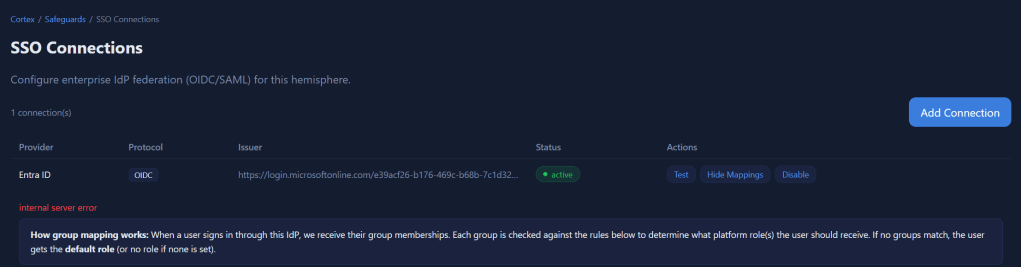
When a user authenticates via SSO, the IdP sends their group memberships in the token claims. The group-role mapper translates these into platform roles.
How Mapping Works
Each IdP configuration stores a `group_role_mapping` JSON document:
{ "mappings": [ { "idp_group": "Platform-Admins", "platform_role": "tenant_admin", "match_type": "exact", "priority": 10 }, { "idp_group": "team-.*-developers", "platform_role": "tenant_operator", "match_type": "regex", "priority": 50 } ], "default_role": "tenant_member", "multi_role_strategy": "lowest_privilege", "unmapped_group_action": "ignore"}
Match Types
| Type | Behavior | Use Case ||------|----------|----------|| `exact` | Case-sensitive string equality | Named groups like "Platform-Admins" || `regex` | Regular expression test | Pattern groups like "team-.*-admins" || `guid` | Case-insensitive UUID comparison | Azure AD group Object IDs |
Lessons Learned: The regex match type introduces a potential denial-of-service vector. A catastrophically backtracking pattern (e.g., (a+)+$) supplied by a tenant admin can cause the policy engine to hang on every login attempt, effectively taking down authentication for that tenant.
Multi-Role Strategy
When a user belongs to multiple groups that map to different roles:
- **lowest_privilege**: Only the lowest role is assigned. Safest option — prevents accidental privilege stacking and lockout.
- **merge**: All matched roles are assigned. Use when users genuinely need permissions from multiple groups.
- **first_match**: Stops at the first matching group (by priority order). Predictable but less flexible.
Lessons Learned: When using platform managed roles, to avoid arbitray choosing the first group, I invoke pickHighestRole() walks a priority list from the groups claim, instead of trusting array position. A user with roles: [“tenant_operator”, “tenant_admin”] can correctly gets tenant_admin regardless of array order. Otherwise, my prototype risked arbitrarily assigning permissions that can result in lock-out. When considering customer managed customer role, the platform evaluate the permissions of each mapped group and role and enforce the user’s permissions.
least_privilege: By default all api requests are denied unless user/group is assigned a role and policy. When evaluating, platform assigns only the least most powerful managed platform role matched across all of the user’s groups. This prevents permission accumulation from multiple roles.
For, customer Tenant roles and custom policies each policy is cumulative and evaluated before executing any api. This is similar to the AWS platform, where actions can be denied, and other permissions will then be evaluated and be additive.
Tenant-Scoped Mapping
Group mappings are always evaluated with tenant context:
mapGroupsToRoles(userGroups, groupMappingConfig, { context: { tenantId, idpConfigId }})
This prevents **IdP group confusion attacks**: if Tenant A and Tenant B both have a group called “Admins” in their respective IdP configurations, the group name “Admins” only maps to a role within the context of the tenant whose IdP config was used for authentication.
Role Sync with Source Tracking
Role assignments are stored with their source:
INSERT INTO user_role_assignments (user_id, tenant_id, role_id, source, source_details)VALUES ($1, $2, $3, 'idp_group_mapping', '{"idp_groups": ["Platform-Admins"]}')
The `source` column (`manual`, `idp_group_mapping`, `default`, `scim`) allows the system to:
- Distinguish admin-assigned roles from IdP-synced roles
- Re-sync IdP roles on login without overwriting manual assignments
- Audit where each role came from
Protecting Against Common Multi-Tenant Attacks
Query String Parameter Injection
**Attack**: Attacker modifies `?tenantSlug=victimTenant` in the URL to access another tenant’s data.
**Mitigation**: The tenant identity comes from the JWT `tenant_slug` claim, not from URL parameters. The middleware compares the URL parameter against the JWT claim and rejects mismatches with a generic 403. Even if the URL is manipulated, the JWT is signed and cannot be modified.
IDOR (Insecure Direct Object Reference)
**Attack**: User A guesses User B’s UUID and accesses `/tenants/acme/users/{userBId}`.
**Mitigation**: Every query includes `WHERE tenant_id = $1`, so User B’s record is only returned if they belong to the same tenant. RLS provides a second enforcement layer at the database level. Self-modification prevention blocks users from modifying their own roles.
Authorization Code Replay
**Attack**: Attacker intercepts and replays an OAuth authorization code.
**Mitigation**: PKCE ensures the code is useless without the `code_verifier`. The `AuthorizationCodeTracker` in the security hardening module SHA256-hashes and tracks used codes with a 10-minute TTL. Reuse triggers an `AUTH_CODE_REUSE_ATTEMPT` audit event.
Token Replay
**Attack**: Attacker captures a valid token and replays it in a different session.
**Lessons Learned:** `jti` is an optional claim in the OIDC spec and is not guaranteed to be present in ID tokens from all identity providers. When `jti` is absent, the `JtiTracker` has nothing to record, and replay protection silently provides zero coverage for that session.
Mitigations:
- Verify that each supported IdP (Entra ID, Okta, Ping, Auth0) is configured to include
jtiin its ID tokens, and document this as a required configuration step during IdP onboarding. - Configure the
JtiTrackerto reject tokens that lack ajticlaim entirely if your security posture requires replay protection. This forces IdPs to be configured correctly. - Alternatively, log a
MISSING_JTI_CLAIMaudit event at warning severity whenjtiis absent so that gaps in coverage are visible.
Cross-Tenant Token Reuse
**Attack**: User authenticated for Tenant A presents their token to Tenant B’s API endpoints.
**Mitigation**: Five layers mitigate this:
- Audience claim validation (different client_id per tenant)
- JWT tenant_slug claim checked against URL tenant
- Repository functions require tenantId parameter
- PostgreSQL settings and policies scope all queries
- Database unique constraints prevent data collision
### Certificate and Key Weaknesses
**Attack**: IdP uses weak signing keys or expired certificates.
**Mitigation**: The certificate validator rejects RSA keys under 2048 bits and EC keys under P-256. SHA-1 and MD5 signature algorithms are rejected. Certificate expiry warnings fire at 30 days and go critical at 7 days, logged as `CERT_EXPIRY_WARNING` audit events.
## Audit Trail
Every security-relevant action is logged as a structured audit event:
{ "timestamp": "2026-04-01T14:32:01.123Z", "eventType": "SSO_LOGIN_SUCCESS", "eventCategory": "authentication", "severity": "info", "details": { "provider": "entra_id", "isNewUser": false, "role": "tenant_admin" }, "context": { "tenantId": "uuid", "userId": "uuid", "requestId": "correlation-id", "sourceIp": "10.0.0.1" }}
Sensitive fields (passwords, tokens, secrets, authorization codes, code verifiers) are automatically sanitized before logging. The audit logger covers 20+ event types across authentication flows, security violations, IdP configuration changes, and user provisioning.
Lessons learned: Audit log sourceIp values are currently captured from the request object. In deployments behind a load balancer or reverse proxy, the real client IP must be read from X-Forwarded-For or X-Real-IP headers and these headers are trivially spoofable by clients unless stripped and re-set by a trusted edge proxy. A future hardening pass should validate that source IP capture is proxy-aware, uses only the rightmost trusted hop in X-Forwarded-For, and is explicitly configured per deployment environment.
Back-Log (Always Challenging / Always Improving )
During every iteration, I find and learn new topics. What I think was secure before, is yesterday’s news. So in an attempt to be transparent, I’ve also added some other items to consider from findings my prototype that may help others avoid bugs in their solutions.
Lessons Learned: kid Parameter Injection – Patched (Complete)
The article describes JWKS validation in detail but never mentions kid header injection. The kid (Key ID) field in a JWT header is attacker-controlled input that your validator uses to look up the correct key. This is one of the most actively exploited JWT attack surfaces per Portswigger/Burp research:
kidpath traversal: If the JWKS lookup useskidin a file path (e.g.,/keys/{kid}.pem), an attacker can supply../../etc/passwdor similar.kidSQL injection: Ifkidis used in any DB query to retrieve a key, unsanitized input becomes an injection vector.kidSSRF: If the validator fetches from a URL that incorporateskid, an attacker-controlledkidcan pivot to internal services.
The validator must treat kid as completely untrusted input validated against the cached JWKS key set by exact match only, never incorporated into file paths, queries or HTTP requests. This belongs explicitly in the signature verification section.
Lessons Learned: jku / jwk / x5u / x5c Header Injection – Patched (Complete)
My article documents algorithm allow listing (none rejection, symmetric rejection) but missed the family of attacks where an attacker manipulates which key is used rather than which algorithm:
jku(JWK Set URL): Attacker adds ajkuheader pointing to their own key server. If the validator fetches fromjkuinstead of the registeredjwks_uri, the attacker’s self-signed token validates successfully.jwkembedding: Attacker embeds their own public key directly in the JWT header’sjwkfield. If the validator trusts inline keys, any token signed with the corresponding private key passes.x5u/x5c: Same class of attack via X.509 certificate URL or inline certificate chain.
RFC 8725 (JWT Best Current Practices) explicitly requires rejecting jku, jwk, x5u, and x5c headers unless they are explicitly allowlisted and validated against pre-registered values.
Lessons Learned: redirect_uri Validation — OIDC Core §3.1.2.1 – Patched (Complete)
My article covers PKCE and state in detail but never addressed redirect_uri validation. This is one of the top OAuth attack vectors (OWASP OTG-AUTHZ, Portswigger OAuth labs). OIDC Core 1.0 requires exact string match of the redirect_uri sent in the authorization request against the pre-registered URI. Common implementation flaws:
- Accepting prefix matches (
https://app.com/callbackmatcheshttps://app.com/callback/evil) - Accepting wildcard or regex patterns in registered URIs
- Accepting open redirects via
redirect_uri=https://attacker.comif registration validation is loose
// ═══════════════════════════════════════════════════════════════════════════ 345 + // STEP 1b: Validate redirect_uri (OIDC Core §3.1.2.1 — exact match) 346 + // The redirect_uri used in the token exchange MUST exactly match the one 347 + // stored in the session state from the original authorization request. 348 + // This prevents authorization code injection via redirect manipulation. 349 + // ═══════════════════════════════════════════════════════════════════════════ 350 + if (params.storedRedirectUri && redirectUri !== params.storedRedirectUri) { 351 + logger.warn("federated.callback.redirect_uri_mismatch", { 352 + tenantId, 353 + expected: params.storedRedirectUri, 354 + received: redirectUri 355 + }); 356 + const error = new Error("redirect_uri mismatch - possible authorization code injection"); 357 + error.code = "REDIRECT_URI_MISMATCH"; 358 + throw error; 359 + } 360 + 361 + // ═══════════════════════════════════════════════════════════════════════════ 362 // STEP 2: Exchange Code for Tokens 363 // ═══════════════════════════════════════════════════════════════════════════
Lessons Learned: response_type Restriction – Best Practice
The application should only accept response_type=code is accepted.
- Forcing
response_type=token(implicit flow) — bypasses PKCE entirely, token appears in URL fragment - Forcing
response_type=code token(hybrid flow) — token issued before code exchange, PKCE protection partially bypassed
The authorization request builder explicitly enforces response_type=code and reject all other values. This should be stated.
      107
      108    // Build authorization URL
      109 +  // SECURITY: Only response_type=code is permitted (authorization code flow with PKCE).
      110 +  // Implicit flow (response_type=token) and hybrid flow (response_type=code token)
      111 +  // are explicitly rejected — they bypass PKCE protection and expose tokens in URL fragments.
      112    const url = new URL(metadata.authorization_endpoint);
      113    url.searchParams.set("response_type", "code");
      114    url.searchParams.set("client_id", idpConfig.clientId);
1005 + // Reject implicit/hybrid flow: if a token appears in query params,
1006 + // the IdP returned a response_type we didn't request. This bypasses PKCE.
1007 + if (req.query.access_token || req.query.id_token || req.query.token) {
1008 + logger.warn("sso.auth.callback.unexpected_token_in_query", { tenantSlug });
1009 + return res.status(400).json({ error: "unexpected token in callback - only authorization code flow is supported" });
1010 + }
1011 +
1012 if (!code || !state) {
1013 return res.status(400).json({ error: "code and state are required" });
1014 }Lessons Learned: No acr / amr Claim Enforcement — MFA Assurance Gap – (Patched)
My prototype never considered acr (Authentication Context Class Reference) or amr (Authentication Methods References). These OIDC claims tell you how the user authenticated and whether they used a password only, MFA, hardware key, etc. In a multi-tenant enterprise system:
- A tenant admin should be able to require MFA for all logins (
acr=urn:mace:incommon:iap:silveror similar, oramrcontainingmfa) - Without enforcing
acr/amr, a user who bypasses MFA at the IdP (e.g., via a legacy auth path) can still get a valid token your system accepts - OWASP ASVS §2.8 and enterprise IAM standards (NIST 800-63B) require that the assurance level of authentication is verified, not just that authentication occurred
Microsoft Entra ID Multi-Tenant Issuer Validation Flaw
For good measure, iss must match “the registered IdP issuer URL exactly.”
- For Entra ID specifically. Entra ID’s common endpoint (
https://login.microsoftonline.com/common/v2.0) issues tokens - Where the
issclaim ishttps://login.microsoftonline.com/{tenant-id}/v2.0meaningissvaries per tenant.
If a multi-tenant Entra app validates iss against the common endpoint URL rather than the specific tenant’s issuer, an attacker who controls any Entra tenant can obtain a valid token and pass iss validation against another tenant’s application.
This is a documented, real-world attack class. Although not a bug in my prototype, highlighting again and saying explicitly that for Entra ID, iss is validated against the specific tenant’s issuer URL (https://login.microsoftonline.com/{expected-tenant-id}/v2.0), not the common endpoint and that the tenant ID in the issuer is cross-checked against the expected tenant.
Rate Limiting Absent from Auth Endpoints — OWASP ASVS §2.2 / OTG-AUTHN-003
The article describes no rate limiting anywhere on authentication-related endpoints. Although implied, I want to state explicitly you MUST add rate limiting immediate after adding your functional API. This is a good skill to add to your claude.md/ In this article it would be a gap to leave anyone walking away thinking they can copy this article and build a product and ship wit..
Lessons Learned: Token Binding / DPoP Not Mentioned — RFC 9449 (Partial)
For a platform positioning itself as enterprise-grade, the absence of any token binding mechanism is worth noting as a future consideration.
Without DPoP (Demonstrating Proof of Possession, RFC 9449) or similar, a stolen platform access token is fully transferable —the attacker can use it from any IP, any device. This is the complement to the token revocation gap already documented: revocation handles “kill this token,” DPoP handles “this token only works for its original holder.”

Currently, implemented an optional IP binding which can be used to further lockdown tokens to PAWS IP ranges, corporate public proxy ranges. Future feature and slices now include more effective mechanism to mitigate this situation.
Platform Session Lifecycle Not Described — OWASP OTG-SESS-001/003/007 – Patched (Partial)
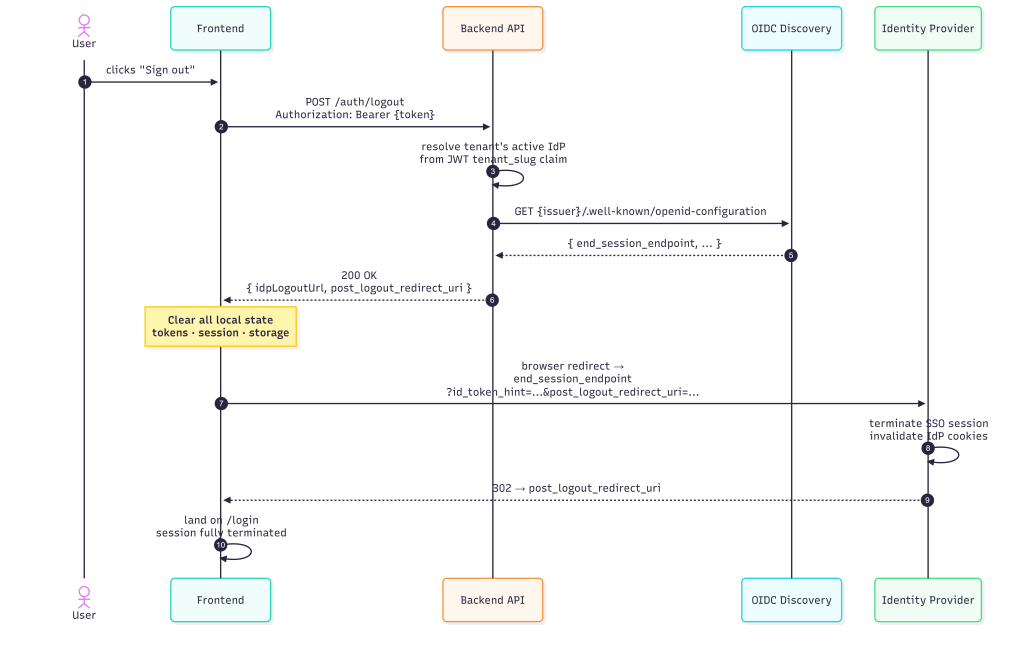
My article focused entirely on the SSO authentication flow but says nothing about what happens to the platform session after authentication succeeds. OWASP testing requires evaluating:
- Session fixation: Is a new platform session created after SSO callback? Or is a pre-existing session token reused (fixation vector)?
- Logout: Is there a platform logout that also initiates OIDC RP-Initiated Logout (OpenID Connect RP-Initiated Logout 1.0)? Or does platform logout only clear the local session while the IdP session remains active?
- Session timeout: Platform session TTL independent of JWT
exp? - Concurrent sessions: Can the same user have multiple simultaneous platform sessions? Is there a cap?
// IdP logout is best-effort — don’t fail platform logout if
Warning: If the IdP’s end_session_endpoint is unreachable or returns an error, the platform session is terminated but the IdP SSO session remains active.
As a good measure, it should be clear that life cycle, token management, state management / revocation will be another topic/article, but MUST always be implemented. But first we must be able to generate tokens and test them before building a framework around managing them.
Partial Patch
// ═══════════════════════════════════════════════════════════════════════════ 662 + // POST /auth/logout — Platform logout + OIDC RP-Initiated Logout URL 663 + // Returns the IdP's end_session_endpoint for federated users so the 664 + // frontend can redirect to terminate the IdP session too. 665 + // OWASP OTG-SESS-001/003: session termination on both RP and IdP. 666 + // ═══════════════════════════════════════════════════════════════════════════ 667 + app.post("/auth/logout", requireAuth, async (req, res) => { 668 + try { 669 + const claims = req.auth.claims || {}; 670 + let idpLogoutUrl = null; 671 + 672 + // For federated users, resolve the IdP's end_session_endpoint 673 + if (claims.auth_method === "federated" && req.auth.tenantSlug) { 674 + try { 675 + const tenantId = await resolveTenantId(req.auth.tenantSlug); 676 + const idpResult = await pool.query( 677 + `SELECT id, issuer, metadata FROM tenant_idp_configs 678 + WHERE tenant_id = $1 AND status = 'active' 679 + ORDER BY activated_at DESC LIMIT 1`, 680 + [tenantId] 681 + ); 682 + 683 + if (idpResult.rows.length > 0) { 684 + const idpConfig = idpResult.rows[0]; 685 + const metadata = idpConfig.metadata || {}; 686 + 687 + // Try cached metadata first, then OIDC discovery 688 + let endSessionEndpoint = metadata.end_session_endpoint; 689 + if (!endSessionEndpoint) { 690 + try { 691 + const { fetchDiscoveryMetadata } = require("./oidc-token-validator"); 692 + const discovery = await fetchDiscoveryMetadata(idpConfig.issuer); 693 + endSessionEndpoint = discovery.end_session_endpoint; 694 + } catch (_e) { /* IdP may not support RP-Initiated Logout */ } 695 + } 696 + 697 + if (endSessionEndpoint) { 698 + const logoutUrl = new URL(endSessionEndpoint); 699 + // post_logout_redirect_uri tells the IdP where to send the user after logout 700 + const frontendUrl = process.env.FRONTEND_URL || "http://localhost:5173"; 701 + logoutUrl.searchParams.set("post_logout_redirect_uri", frontendUrl); 702 + // id_token_hint helps the IdP identify which session to terminate 703 + // (we don't have the original id_token, but client_id is sufficient for most IdPs) 704 + logoutUrl.searchParams.set("client_id", metadata.client_id || ""); 705 + idpLogoutUrl = logoutUrl.toString(); 706 + } 707 + } 708 + } catch (_e) { 709 + // IdP logout is best-effort — don't fail platform logout if IdP is unreachable 710 + } 711 + } 712 + 713 + logger.info("auth.logout", { 714 + actorId: req.auth.actorId, 715 + tenantSlug: req.auth.tenantSlug, 716 + authMethod: claims.auth_method || "local", 717 + hasIdpLogout: !!idpLogoutUrl 718 + }); 719 + 720 + return res.status(200).json({ 721 + loggedOut: true, 722 + idpLogoutUrl 723 + }); 724 + } catch (_error) { 725 + return res.status(200).json({ loggedOut: true, idpLogoutUrl: null }); 726 + } 727 + }); 728 +
Lessons Learned: id_token_hint Missing from Logout — OIDC RP-Initiated Logout §2
The original implementation sets client_id on the end session URL but explicitly comments it cannot send id_token_hint because the original ID token isn’t retained:
// id_token_hint helps the IdP identify which session to terminate// (we don't have the original id_token, but client_id is...)logoutUrl.searchParams.set("client_id", metadata.client_id);
This was a real problem. The OIDC RP-Initiated Logout 1.0 spec treats id_token_hint as the primary mechanism for IdPs to identify which session to terminate. Without it:
- Entra ID will show an account picker / “are you sure?” confirmation screen instead of silently terminating
- Okta may not terminate the session at all in some configurations
- Ping Identity behaviour varies by policy
Example Patch
           +              // id_token_hint: the original IdP id_token from the user's last SSO login.
      715 +              // With this, Entra/Okta/Ping silently terminate the session.
      716 +              // Without it, most IdPs show a confirmation screen.
      717 +              if (lastIdToken) {
      718 +                logoutUrl.searchParams.set("id_token_hint", lastIdToken);
      719 +              } else {
      720 +                // Fallback: client_id lets the IdP identify the RP but may prompt for confirmation
      721 +                logoutUrl.searchParams.set("client_id", idpConfig.client_id || "");
      722 +              }
What’s Next For My Prototyping
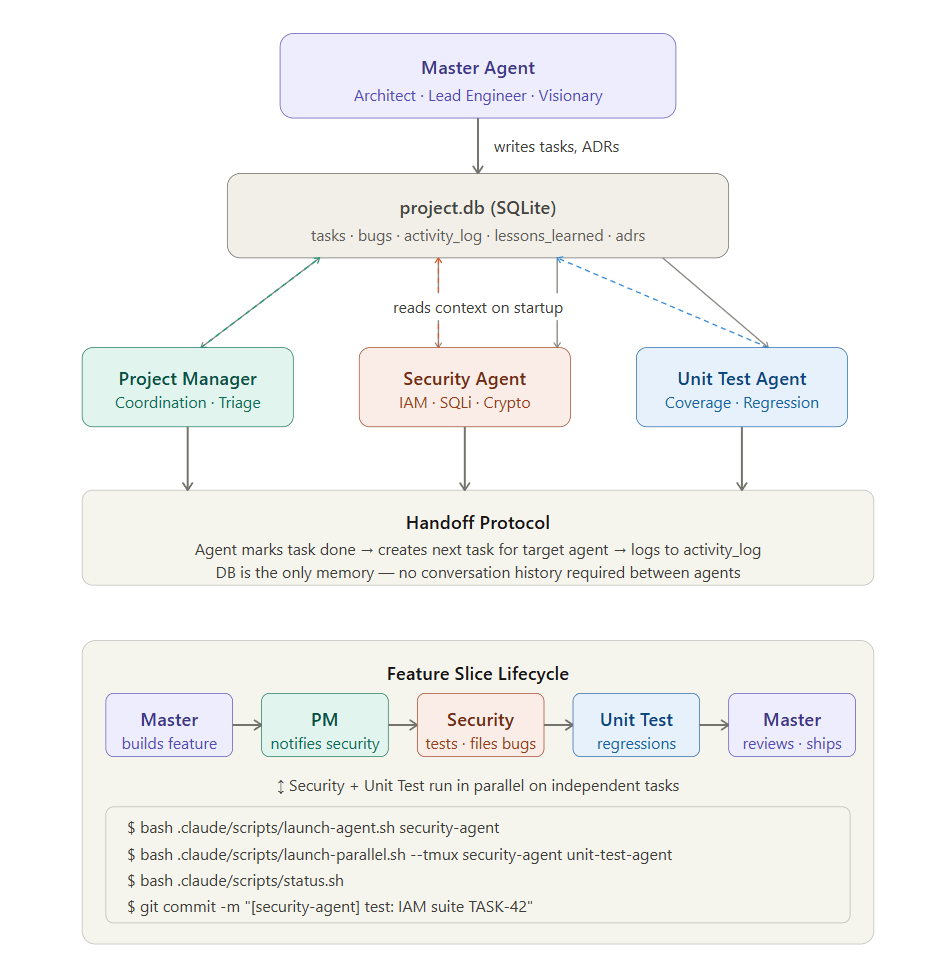
As I continue to build my protype multi-tenant SaaS AI platform, I plan to experiment with accelerating my work by incorporating multi-agent and subagent systems to coordinate basic unit testing and security testing.
While I may regret this later, initially I’m planning scaling my work with something similar to or an derivation of the diagram below. There are more mature models for this such as multi agent CICD or implementing a-2-a. For now, I’m going to explore a localized x-agent coordinated framework where agents create, question & challenge each other and steer my prototype and benchmark the results.
I’ll take any gaps currently identified, and future bugs or gaps in the prototype and feed them into an automated and iterative SDLC using orchestrated agents and measure the bugs and quality along the way, the best I can …